


The VMOS Magic Box Quick Guide for Beginners ( 1 )
Welcome to VMOS Magic Box!
This guide will take you from unboxing to successfully creating and experiencing your first cloud machine in just a few steps.
The VMOS Magic Box Quick Guide for Beginners ( 1 )
Unboxing and Setup
1. Check Accessories
After unboxing, please confirm the following items are complete:
VMOS Edge Host ×1
Power Adapter ×1
💡 It is recommended to use in a stable, well-ventilated environment, avoiding high temperature and humidity.
2. Solid State Drive Preparation and Installation
Notes:
VMOS Magic Box comes with only 32GB built-in storage by default, which is insufficient to create cloud machines.
Please insert or install an external SSD to enable full functionality and normal use.
Purchase Solid State Drive
Only supports NVMe protocol M.2 2280 specification SSDs, compatible with NVMe 2.0 / 3.0 / 4.0 interface specifications.
You can purchase as the below picture from other platforms or merchants according to business storage needs.
Capacity recommendation: 256GB and above.
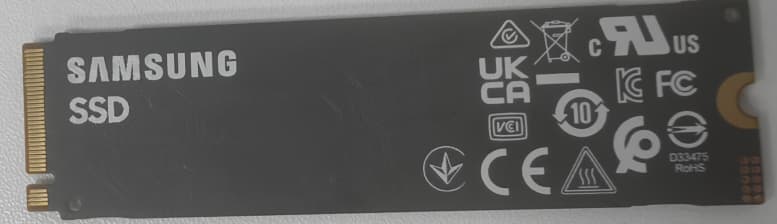
Install Solid State Drive
1. Disconnect the box power, open the magnetic cover.
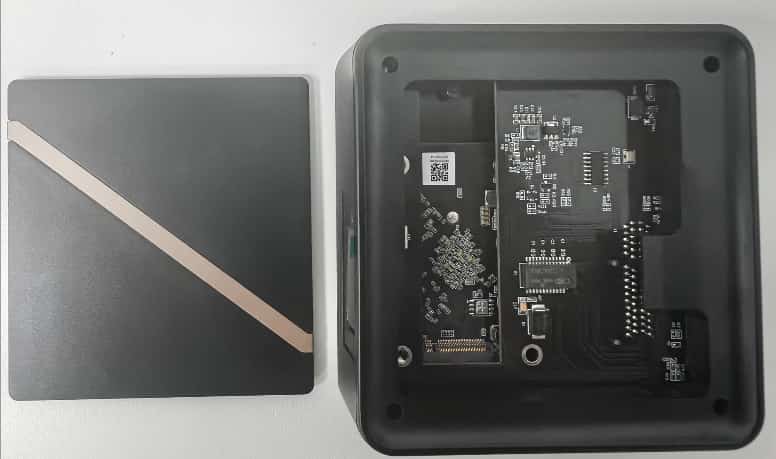
2.Remove the hard drive reserved interface fixing screw.

3. Insert SSD into the designated interface and fix the screw
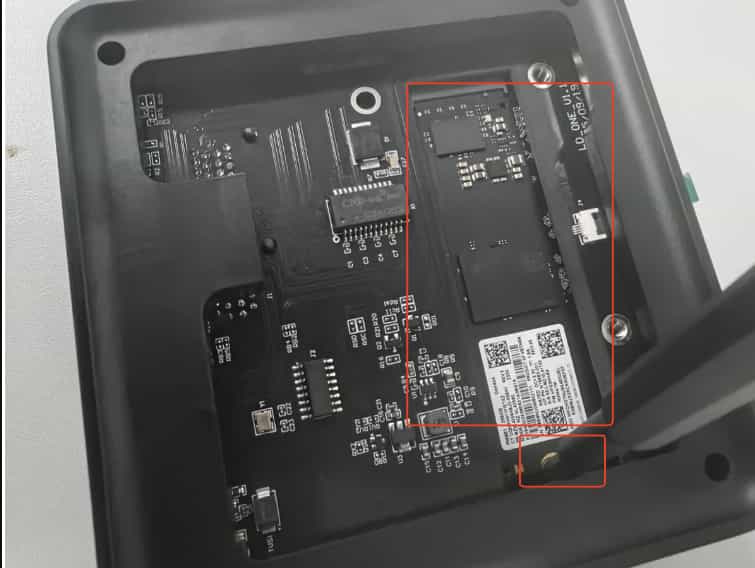
4. After re-powering, the system will automatically recognize the hard drive.
💡 First use will automatically format, please do not power off or remove the hard drive.
3. Connect Power and Network
Connect the box using the included power adapter.
Connect to a router that can access the Internet using an Ethernet cable.
After powering on, the LED screen displays the IP address and UUID indicating the device has started.
📶It is recommended to use wired network to ensure cloud machine stability and low latency.




