
DLDR: In 2026, scheduling Facebook posts is essential for maintaining consistent publishing, improving engagement through optimized timing, and saving time by reducing manual work. It also plays an important role in making a scalable marketing infrastructure for creators, marketers and businesses managing multiple pages or accounts. While Meta Business Suite, Professional Mode, and third-party schedulers provide basic scheduling functions, they come with limitations in flexibility and scalability. For multi-account content distribution strategies, cloud phone solutions provide isolated environments to secure each account. And advanced automation features allow users to schedule content with flexible timing and automate the posting effortlessly.
Why is scheduling Facebook posts important in 2026?
In 2026, Facebook content distribution is more competitive and algorithm-driven than ever. Scheduling posts is no longer just a convenience—it's a core part of any structured content strategy for creators, marketers, and businesses
Consistency is essential for algorithm performance
Facebook's ranking system favors pages that post consistently over time. Scheduled posts can avoid content gaps, helping maintain a stable publishing rhythm, even when you are not online.Better engagement through optimized timing
Posting at the right time can significantly impact reach and engagement. Scheduled posts allow contents distributed at peak activity hours when your audience is most likely to be online.Saves time and improves workflow efficiency
Instead of posting manually every day, smart scheduling allows you to round up content, write your draft, and line everything up at the right times. This can reduce hassles and free up time for strategy and creative workScalable content marketing
For marketers and agencies managing multiple Facebook Pages, scheduling becomes more than important for centralized content planning, easier coordination across campaigns and less operational complexityMaintain stable brand presence
Scheduled content ensures your messaging stays aligned across campaigns, prevents inconsistent posting tone, keeps campaigns structured and predictable and strengthens brand identity over time
Official Guide: How to set a scheduled post on Facebook?
Schedule posts for business pages with Meta Business Suite
If you are using business pages on Facebook, it would be quite easy to set up scheduled post on Meta Business Suite in few steps:
Step 1: Go to your Facebook Page and click "Meta Business Suite" in the left-side menu.
Step 2: Click "Create post" below your Page's profile picture.
Step 3: Complete content for your post (context,photos or videos)
Step 4: Scheduling options, click the Set date and time toggle
Step 5: click the "Set date and time" toggle under the Scheduling options
Step 6: Set a preferred date and time (You can schedule posts to publish between 20 minutes and 29 days away. )
Q. Can you schedule posts on a personal Facebook account?
Absolutely yes, but it can not work in a direct way. Scheduling posts for a personal Facebook account requires either switching to pro mode or using third-party social media schedule management tools:
Q. How to schedule posts under pro mode?
Step 1: Launch Facebook App and go to your profile page
Step 2: Tap the three dots (⋯) next to the "Edit Profile" button
Step 3: Click Turn on professional mode from the menu
Step 4: Tap "What's on your mind?" At the top of your Feed, Page or profile to create your post
Step 5: Complete post content and click Next
Step 6: Click post/Reels setting and schedule the publishing time for your content under Scheduling options
Use social media schedule management tools to schedule Facebook content
Social media schedule management tools (e.g. Buffer and Hootsuite) work by integrating with your Facebook profile or Page through authorized access. Once connected, you can prepare content inside the tool, set a publishing time, and the system automatically sends the post to Facebook when the scheduled time is reached. This removes the need to manually publish each post and allows content to be managed in a single dashboard.
The centralized management and automation is time-saving and provides more flexibility. However, it commonly requires paid plans for advanced scheduling or automation features. In addition, such schedulers typically do not suffice for supporting content distribution on multiple Facebook accounts. Schedulers can not separate environments for Facebook accounts, running multiple profiles in a shared environment can easily be tracked and flagged by Facebook's algorithm. On the other hand, certain features like engaging with the audience and advanced workflow can not be fully supported.
What makes cloud phones more suitable for managing multiple Facebook accounts than traditional schedulers?
It is a common strategy for social media marketers and businesses to manage multiple Facebook accounts at scale. Traditional methods we discuss above may be sufficient for several accounts, but when it comes to dozens or even hundreds of profiles, they often fall short in flexibility, automation, and accounts separation. Cloud phone solution provide a more scalable infrastructure by providing independent mobile-first environments for each account, making it a game changer for smart multi-account operations.
Device-level isolation reduces risk of account association
Unlike traditional schedulers that operate within a shared browser or device, cloud phone create fully separated mobile environments for each Facebook profile, which helps prevent data overlap between sessions. Fully isolated environments provide clean and stable setup to manage multiple profiles and reduce the risk of accounts linkage.Smart workflow enables more than just scheduling
Reliable cloud phone service providers often equipped with automation features, among them VMOS Cloud support broader advanced automation by AI agent, RPA and open API. And the former two support users effortlessly automate workflows even without coding knowledge. What's more, it outperforms in simulating human-like actions to bypass bot detection and avoid behavior clusters.High scalability supports multi-account content distribution strategies
Cloud phone is suitable to handle over 500- 10,000 profiles simultaneously, making it a good solution for agencies or large-scale businesses. Instead of relying on external tool integrations, profiles can be managed and operated safely and seamlessly within one platform.
How to bulk-schedule and auto-post on Facebook with VMOS Cloud?
Then let's move from overwhelming manual work to smart workflow. Here is a quick guide to schedule Facebook posts and automate the publishing on VMOS Cloud.
Step 1: Go to VMOS Cloud official website to sign in and purchase your cloud phone(s).
Step 2: Install Facebook, then create a new account or log into an existing account. If you are using new profiles, never skip the warm-up phase to solidate the upfront trust signals with Facebook.
If there are multiple profiles, just go to the App Market and Batch install for targeted devices.
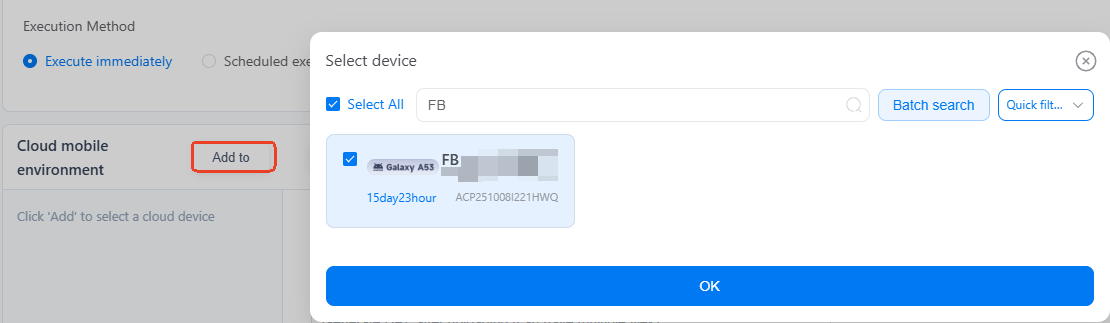
Step 3: Select Post on Facebook in the template store and configure the task.
Click "Add to" to select target device(s)
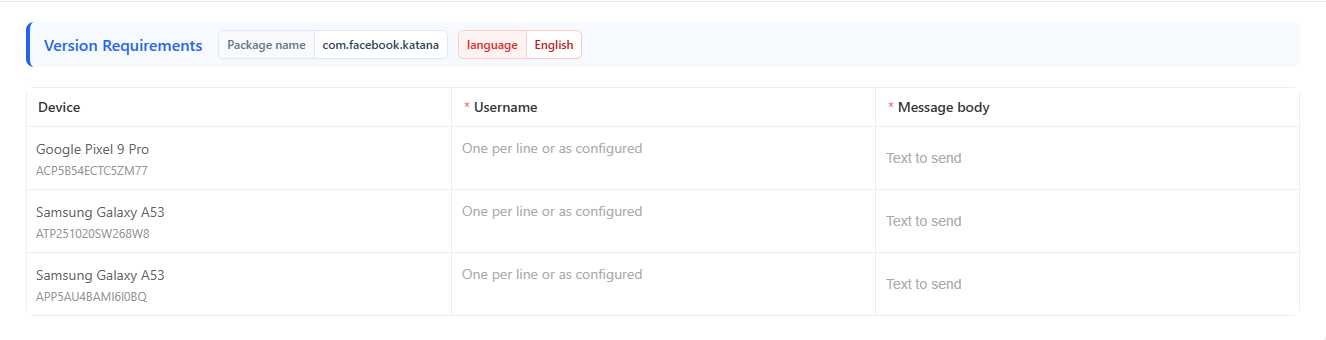
Upload Media files for the post and input the Caption. Use Batch parameter settings if there are multiple devices.You can set different content for different accounts, making bulk content distribution easy.
Step 4: Schedule optimal time to auto-post the content
There are two general Execution Methods: Execute immediately and Scheduled execution. The latter supports high flexibility to set publishing time for posts.
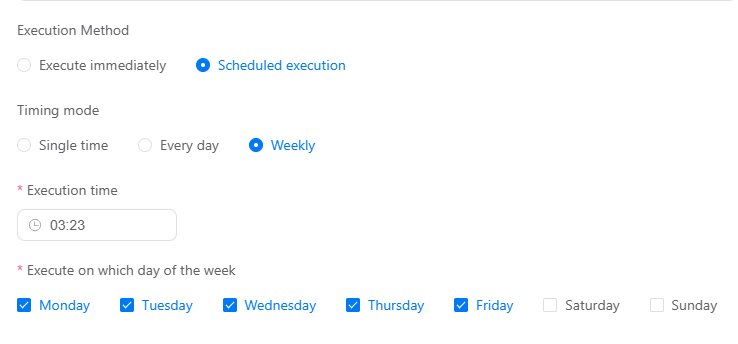
Single time: You can specify an exact date and time to auto-post content. There is no restriction on the time window, you can set any time as per need.
Every day: Running the same task daily at a selected time is also supported.
Weekly: This allows you to decide the task run on which day of the week at a specified time.
Step 5: Click Publish to complete.
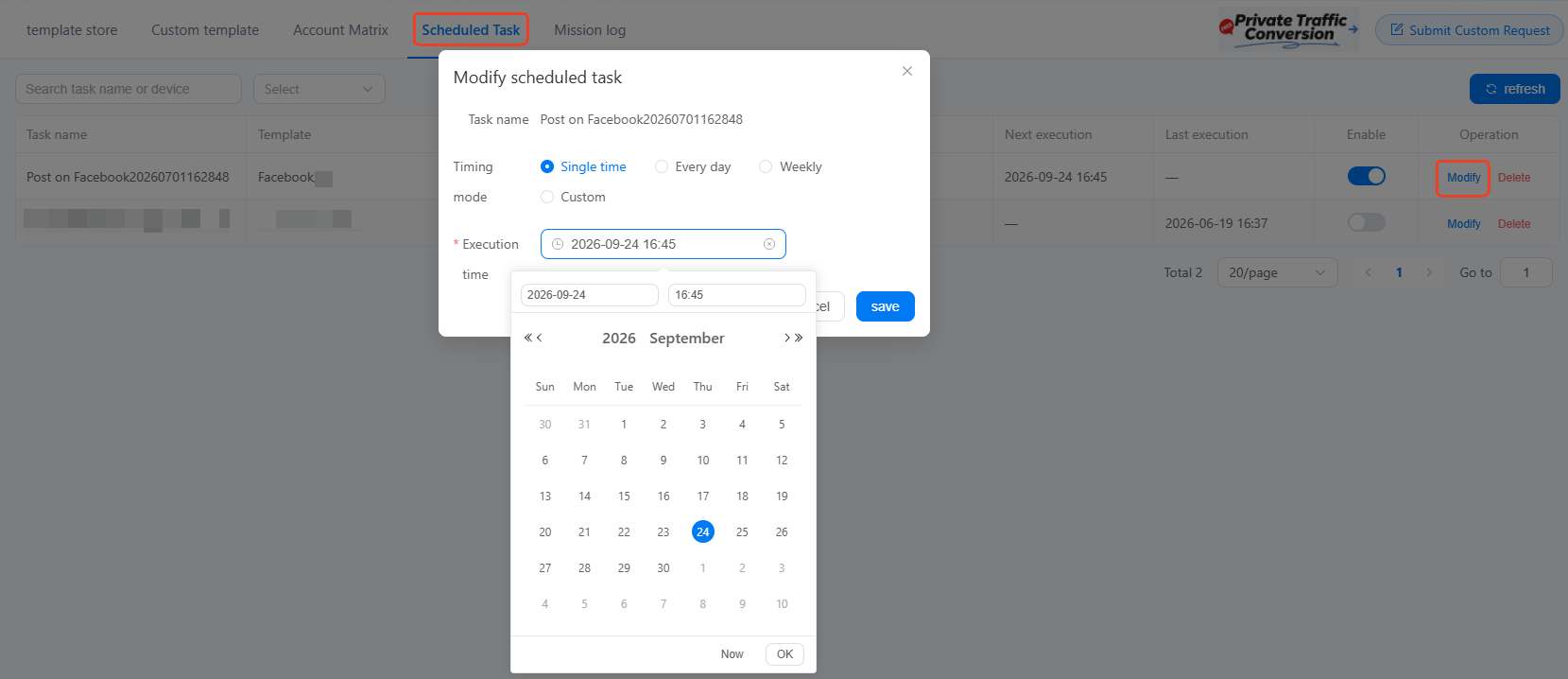
What if you want to change the execution time of the post?
In some cases, you may need to adjust the timing of a post after it has already been scheduled, such as when your content strategy changes or you want to target a different peak engagement window. This is a common scenario in content management workflows and you can do this simply go to the scheduled tasks page, locate the post and modify its scheduled time by selecting a new date and time before it goes live.
FAQs
Can you schedule posts directly on Facebook?
Yes, you can use Meta Business Suite to schedule posts for business pages. If you are using a personal account, turn on the pro mode and then make the schedule for content.
How do I schedule posts on Facebook using personal account?
You can turn on the pro mode first and then set a scheduled post under Scheduling options. Or, using Facebook schedulers to do that.
Is it safe to schedule and post Facebook content with cloud phone?
Yes. Cloud phone provides an isolated environment for each Facebook profile and reliable service providers often provide advanced automation features to smart the content distribution. In addition, always stick to Facebook guidelines to safeguard your accounts.



