
DLDR: Facebook account warm-up is the gradual process to build trust score with the platform and generate human-like activity patterns through well-scheduled actions such as browsing, liking, comments to reduce the risk of platform restrictions.
A reference warm-up strategy that can be used as a general guideline:
Day 1: Profile setup — photo, bio, location, interests etc.
Day 2–7: Passive behavior building — Browse content daily (15–30 mins), like a small number (5~10/day) of posts, and leave 2~5 natural comments per day.
Day 7–14: Active engagement growth — Send 1~3 friends requests daily, join 2~3 relevant groups, and post simple original content.
Day 14+: Sustainable Facebook growth — Maintain consistent engagement, and gradually diversify interactions (likes, comments, shares, groups).
Why does warm-up matter for Facebook accounts?
Facebook account warm-up refers to the gradual process of building activity and trust on a new Facebook account. Instead of using the account heavily right after creation, users slowly increase normal behaviors such as browsing, liking posts and engaging with content in a natural way. The goal is to make the account appear like a real, authentic user with consistent behavior patterns.
Build account trust signals
New accounts start with limited trust in Facebook's system. Warm-up helps establish early behavioral history, which increases account credibility over time.
Reduce risk of account flags
Sudden or aggressive activity (e.g., massive posts or likes during a short period of time) can trigger Facebook's anti-spam systems. A proper warm-up reduces the chance of suspicious activity flags and account restriction.
Scalability and long-term stability
For marketers or businesses managing multiple profiles, proper warm-up ensures accounts can scale safely. Pre-warmed accounts tend to have more stable performance, including fewer verification checks, lower chance of being flagged and more consistent engagement behavior recognition
How to warm up a Facebook account the right way?
Start with full profile setup (Day 1)
Objective: Establish a complete and credible account foundation.
Profile setup:
Upload a clear avatar. Complete details such as birthday, gender, location.
Fill out interests, education, job etc.
Passive behavior building (Day 2–7)
Objective: Build trust signals with Facebook's algorithm through consistent, natural behavior.
Content interaction
Scroll through Reels/Stories for 15~30 minutes daily
Like 5~10 posts/Reels per day (keep it minimal and varied)
Visit 5~10 pages (on profiles, comments, posts)Light engagement
Leave 2~5 meaningful comments per day:
React to posts/Reels using thoughtful, human-like words. Not simply emoji or meaningless comments.
Avoid repetitive or spam-like behavior
Active engagement growth (Day 7–14)
Objective: Increase interaction while maintaining behavioral stability to show Facebook that the account is socially active.
Friend requests
Send 1~3 friend requests per day, preferably to real contacts, mutual friends or users with shared interests or connections
Avoid sending bulk or random requests
Groups participation
Join 2~3 Facebook groups relevant to your profile interests
Browse group content regularly and naturally, and engage lightly by participating in conversation
Original content posting
Start posting simple content such as life updates, daily thoughts, casual photos
Avoid promotional and commercial content
Keep posting frequency low at the beginning (e.g., 1 post every 1~2 days)
Daily activity & engagement
Gradually increase time spent on browsing content and frequency of likes, comments etc.
Ongoing tips after day 14: sustainable Facebook growth
After the initial warm-up phase, the focus shifts toward maintaining steady, authentic activity and building long-term account credibility. At this stage, consistent engagement and thoughtful content behavior help reinforce trust signals, ensuring the account continues to perform naturally within Facebook's system while gradually improving reach and interaction quality.
Maintain consistent activity
Keep a stable usage routine with regular logins and daily interactions such as browsing, liking, and commenting. Inconsistent behavior can disrupt account stability.
Continue gradual network growth
Friend additions should remain slow and controlled. Focus on building a realistic social graph by connecting with relevant users and interacting with existing friends' content in a natural way.
Diversify engagement behavior
Use a mix of interactions including likes, comments, shares, and group participation. Engaging with different types of content helps maintain a natural behavioral profile and reduces repetitive activity patterns.
Maintain a sustainable content strategy
Post content at a consistent but moderate frequency. Prioritize authenticity over volume, and vary content types over time to reflect normal user behavior.
Useful tools for Facebook account warm-up in 2026
Manually warming up Facebook accounts can be time-consuming and overwhelming, especially when managing multiple accounts at the same time. Human operations often lead to inconsistencies such as irregular activity patterns, missed engagement steps, or overly aggressive actions due to lack of control. As the profiles scale, these challenges become even more significant. This raises an important question: is there a way to make Facebook account warm-up more structured, efficient, and safe without relying entirely on manual work? — short answer: yes. This is where warm-up support tools come in. They help standardize behavior, maintain consistency, and reduce operational errors while still following natural user activity patterns.
1.Social media schedule and management tools
These tools are designed to help plan and organize Facebook activity in advance. They are commonly used for scheduling posts, managing content calendars, and maintaining consistent engagement timing across accounts.
Pros:
Helps maintain consistent posting and activity schedules
Reduces the risk of missing daily engagement tasks
Improves content planning and organization
Supports long-term consistency in account activity
Cons:
Limited ability to simulate real-time human behavior
Over-scheduling may still appear unnatural if not balanced
Mainly focused on content, not full behavioral simulation
2. Automation tools
Automation tools are used to execute repetitive actions such as liking posts, commenting, browsing content based on predefined rules and workflows.
Pros:
Reduces manual workload significantly
Ensures consistent execution of daily warm-up tasks
Can follow structured warm-up stages automatically
Useful for scaling operations across multiple accounts
Cons:
Risk of unnatural or repetitive behavior patterns if misconfigured
Requires careful setup of timing, frequency, and variation
Over-automation may trigger platform restrictions
3. Cloud phone with automation features
Cloud phone solutions provide authentic mobile environments hosted in cloud servers where Facebook accounts can run independently without physical hardware. VMOS Cloud stands out for device-level isolation and advanced automation, enabling users to warm-up and grow multiple Facebook profiles effortlessly with streamlined workflow while keeping accounts under radar.
Pros:
Fully isolated device environments for each account
Supports scalable multi-account management
Advanced automation features streamline the warm-up process.
Cons:
Requires proper configuration to ensure natural behavior patterns
May introduce operational complexity for beginners
How to automate your Facebook warm-up with VMOS Cloud?
Step 1: Go to VMOS Cloud and log in to your account.
Step 2: Install Facebook from the inbuilt App Store and log into your Facebook account.
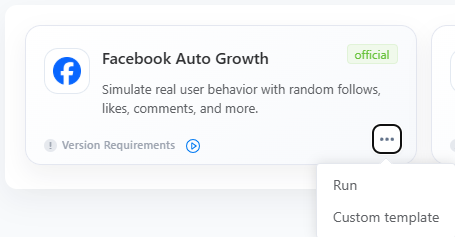
Step 3: Find Automation-> Template store in the left sidebar, and select Facebook from the dropdown menu. Choose the “Facebook Auto Growth” template.

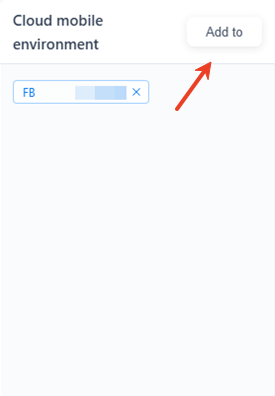
Step 4: Click “Add to” to assign a task for the target device(s).
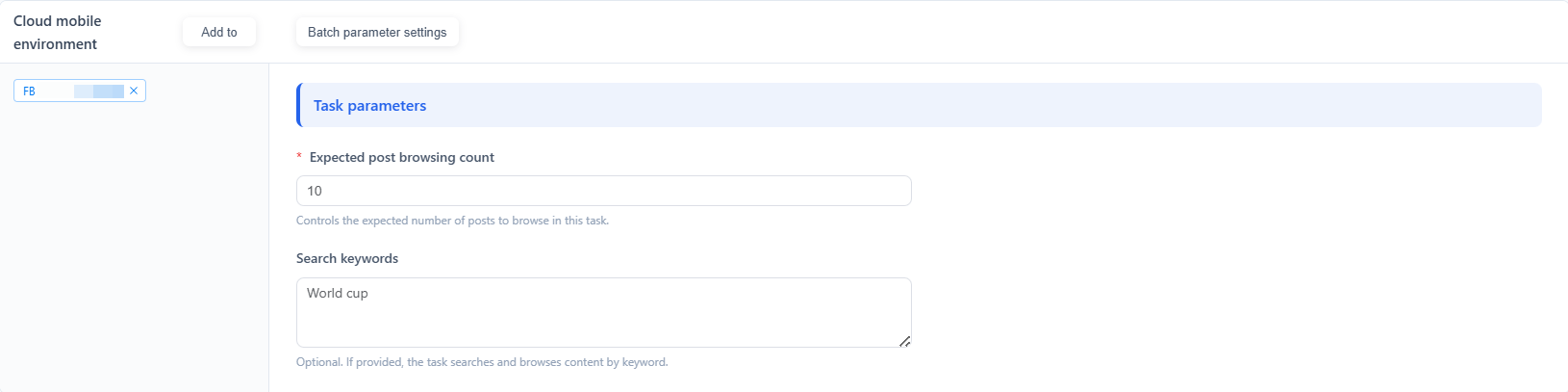
Step 5: Complete task parameters: browsing counts, keywords.
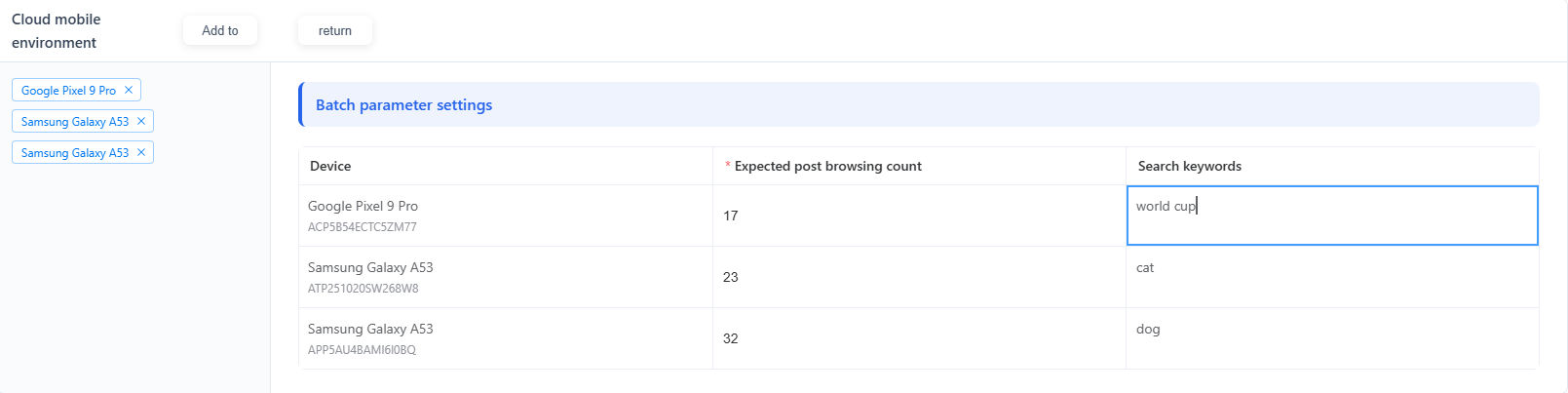
Batch parameter settings make it easy to configure tasks for multiple Facebook accounts.
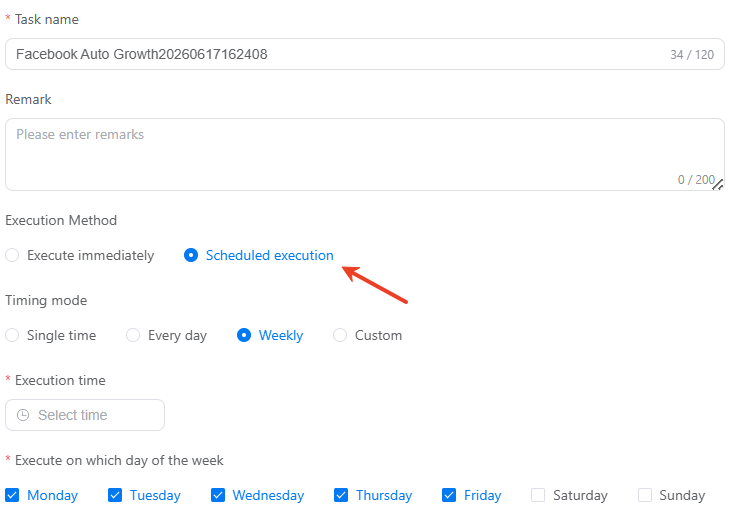
Step 6: Choose a preferred execution method. VMOS Cloud RPA supports the task to be performed immediately or executed on a scheduled time.
Step 7: Publish the task and then check the status on the mission log page.


Preset templates are a very simple way to get started. However, if you have more advanced automation requirements or want to build fully customized workflows, what should you do? VMOS Cloud RPA automation can effectively meet these more complex automation needs. Even without any coding knowledge, you can customize official templates or directly build your own workflows with RPA builder, enabling more flexible and fine-grained control over operations.
FAQs
Why is warming up Facebook accounts so important?
Facebook warm-up helps build early trust signals by gradually increasing natural activity. This reduces the risk of being flagged as suspicious at the very beginning phase.
How long does it take to warm up a FB account?
There is no exact time. Typically, 7-14 days will be sufficient if adopting proper warm-up strategy.
What happens if I skip Facebook warm-up?
Sudden massive activity on a new account can be easily detected as abnormal behavior by Facebook‘’s algorithm. Skipping warm-up may lead to reduced visibility or even account restriction.
Can I use tools to help with account warm-up?
Yes. Tools like VMOS Cloud could help your Facebook account behave naturally just like real humans. And strategic automation can streamline the manual workload and make the warm-up process more efficient.



