




A practical WhatsApp account warm-up strategy:
Days 1–3: Set up your account and start 3–5 genuine conversations with saved contacts.
Days 4–7: Build consistent usage patterns and keep 5–10 daily conversations.
Days 8–14: Expand communication activity gradually to 10–20 active conversations per day and try to reach new contact.
After 2 weeks: Keep regular conversations and avoid sudden changes in activity to ensure long-term stability.
The main challenges of manual warm-up are handling time-consuming repetitive tasks and maintaining consistent behavior patterns. VMOS Cloud simplifies the warm-up process with advanced automation features, allowing users to build a more efficient and safe WhatsApp account warm-up workflow without coding knowledge.
Why does a new WhatsApp account need warm-up?
Creating a new WhatsApp account is easy, but building a trustworthy history takes time. WhatsApp tracks different signals to determine whether an account behaves like a real user. When a newly registered account "cold starts" with high-volume activities — such as sending bulk messages, adding batch contacts at once, or joining multiple groups immediately — the behavior may appear abnormal.
A proper warm-up process allows a new account to gradually develop natural activity patterns through consistent and human-like interactions. This helps establish account credibility over time and creates a stronger foundation for future communication.
Build a natural account history
A new account has limited activity history, so early interactions play an important role in establishing normal behavior patterns. Light actions such as completing profile information, chatting with few contacts, and using WhatsApp features regularly help create a more trustworthy account history and makes the account better prepared for future communication needs.
Safeguard account from being flagged
WhatsApp's algorithm is often more sensitive to abnormal behavior patterns from new accounts. Actions such as sending bulk same messages, large-scale outreach to unknown contacts, action spike or sudden drop will look suspicious. A gradual warm-up process allows users to develop a more consistent workflow and reduce the risk of account restrictions.
Prepare accounts for long-term operations
For marketers and businesses managing WhatsApp as the main customer engagement channel, account preparation is the start point before scaling operations. A well prewarmed account establishes consistent presence from the beginning, supporting businesses to better maintain account reliability as their WhatsApp operations grow.
How to warm up a WhatsApp account in the right way?
The secret behind a successful WhatsApp warm-up strategy lies in consistent and natural behavior patterns. Instead of using a new account for operation immediately, the core is to make the account act like a real user before introducing higher communication workloads.
WhatsApp Account Warm-Up Timeline at a Glance
Days 1–3: Account setup and basic interactions
The goal of the first stage is to complete your account identity and establish basic credibility.
Complete your profile information on the 1st day: add a profile photo and set up bio
Start conversations (3~5) with a few saved contacts on day 2 & 3
At this start point, avoid any promotional messages or contacting large numbers of strangers.
Days 4–7: Build consistent behavior patterns
After establishing basic activity, gradually increase daily interactions like:
Respond to more conversations naturally
Increase chat volume with contacts to 5~10 daily
Expand the conversations to more varied topics
The focus should be consistency rather than reaching a specific and fixed number of messages.
Days 8–14: Gradually scale messaging and expand outreach
At this stage, you can gradually broaden the interactions and increase communication frequency.
Add to 10~20 active conversations per day
Test messaging 1~2 strangers
Participate in relevant group chatting
Keep in mind to make the outreach and conversation personalized rather than sending same bot-like message to many users, which will be flagged as spam
After 2 weeks: Maintain stable long-term usage
Warm-up is only the first step. By now, your account is relatively more stable, then you can take the following suggestions as reference for long-term account management.
Keep regular conversations active
Avoid sudden changes (spike or drop) in activity volume
Keep account performance consistent
Common challenges you may face to keep the account active
1. Warm-up phase is time-consuming
A proper warm-up process cannot be completed instantly. It requires users to perform regular activities over a period of time and gradually increase interactions. Doing repetitive daily tasks and maintaining consistent activity manually can be time-consuming.
2. Maintaining consistent behavior patterns
Consistency is one of the most important parts of account warm-up. However, manual operation can easily lead to inconsistent behavior such as:
Forgetting to perform daily interactions
Using the account too frequently on some days but leaving it inactive on others
Failing to follow a planned warm-up schedule
3. Keep a structured management
Warm-up becomes more complicated when multiple new WhatsApp accounts need to be prepared at the same time. Without proper tools and workflow, managing multiple accounts manually can quickly become inefficient.
How VMOS Cloud helps build a safe and efficient WhatsApp warm-up workflow?
Streamlined workflow makes warm-up effortless
Manually performing routine warm-up tasks and following a schedule every day can be time-consuming, especially when managing multiple new accounts. VMOS Cloud simplifies the process with flexible automation solutions. Users can choose a preset arm-up template as an entry point to run the workflow easily without coding knowledge.Smart scheduling keeps activity consistent
Manual management can easily lead to missed activities or irregular usage patterns. With VMOS Cloud, users can customize automation schedules based on their warm-up plans. Automated tasks can run at predefined times, helping maintain a more consistent activity routine without requiring users to manually perform every step.Organic behavior creates more natural activity patterns
A warm-up process should focus on gradual and natural interactions. However, repetitive actions performed at fixed intervals may create patterns that look less like regular user behavior. VMOS Cloud automation supports random execution intervals with offset settings, introducing variations in task timing instead of following a completely fixed schedule. This helps create more natural activity patterns and makes the warm-up workflow more aligned with regular user behavior.
Next, let's walk through a step-by-step guide on how to warm up a WhatsApp account using VMOS Cloud's preset template:
Step 1: Go to VMOS Cloud and log in.
Step 2: Install WhatsApp from the built-in App Store and then create or log into a new account.
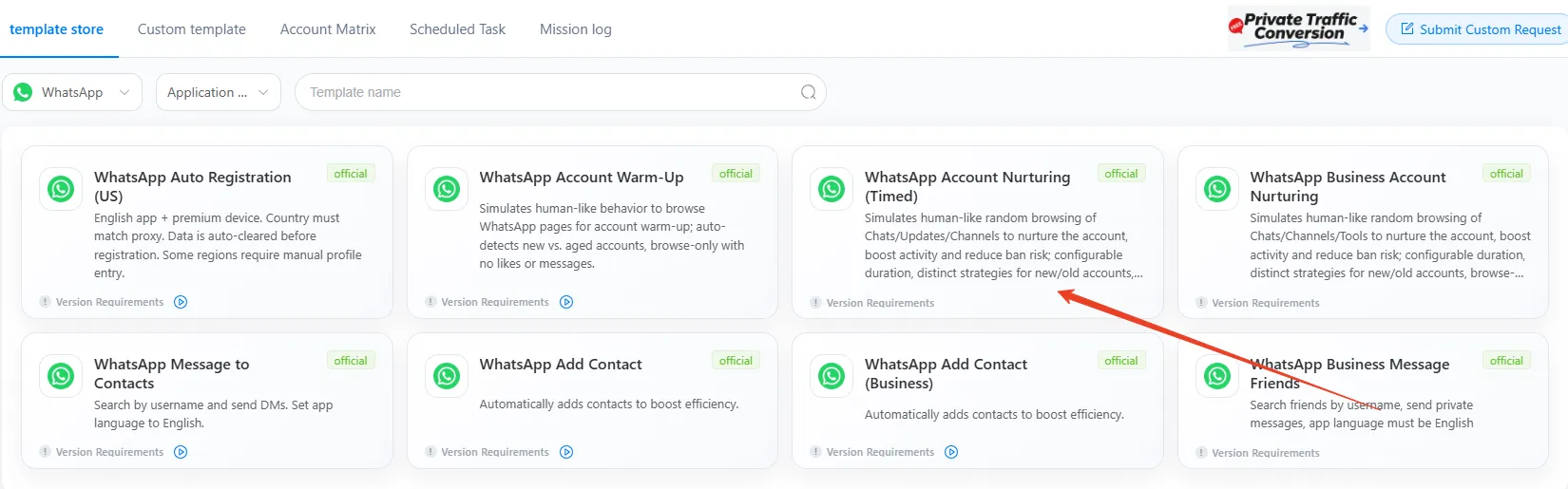
Step 3: Find Automation-> Template store in the left sidebar, and select WhatsApp from the dropdown menu. Choose the "WhatsApp Account Nurturing(Timed)" template.
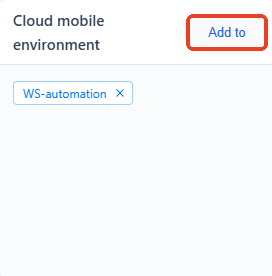
Step 4: Click "Add to" to assign a task for the target device(s).
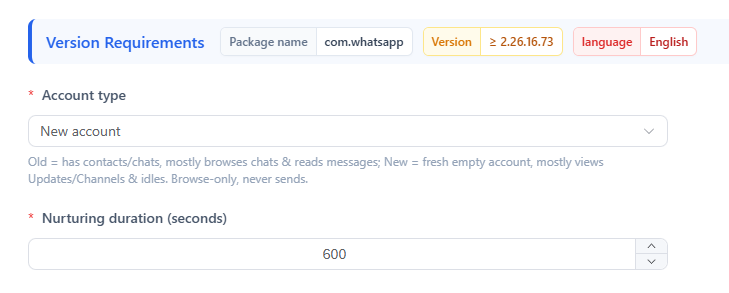
Step 5: Set Account type as New account and adjust the Nurturing duration
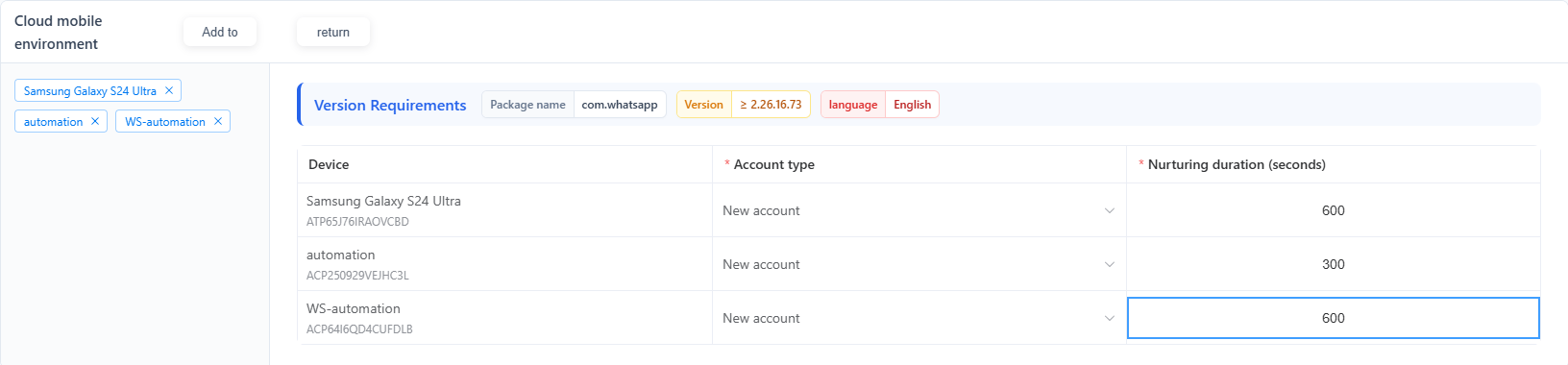
Use Batch parameter settings if you need to warm up several WhatsApp accounts
Step 6: Choose a preferred execution method. VMOS Cloud supports the task to be performed immediately or executed on a scheduled time.
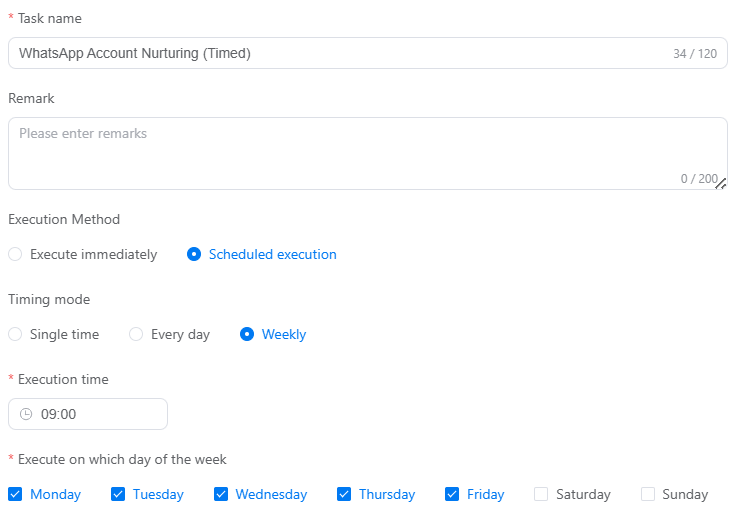
Step 7: Publish the task and then check the status on the mission log page.