
TikTok's anti-fraud system in 2026 has long been immune to basic tricks. Running multiple accounts via VPN on the same laptop, or modifying device fingerprints through emulators, will get the entire matrix wiped out within days. The platform's detection AI has gone beyond surface-level checks and started to perform cross-dimensional verification —it cross-references device kernel signatures, sensor behavior and network origins to determine whether an account belongs to a real user or a management farm.
To survive scrutiny at this level, you need two layers of isolation working in perfect synergy: the cloud phone environment severs hardware-level connections, while the residential proxy network provides a natively trusted network identity. Without either layer, a detectable loophole will be left. This article will focus on the most core combination of "cloud phone + static residential IP" to break down for you how to achieve secure and stable matrix operation.
Why does anti-association require "dual isolation"?
Before selecting a tool, you first need to understand what you are avoiding. TikTok's device risk control and security system mainly revolve around two dimensions:
1. Device Fingerprint Detection: The platform will deeply collect mobile hardware identifiers (such as Device ID, IMEI), sensor data, system resolution, time zone and other information. If multiple accounts are frequently switched on the same physical mobile phone or the same simulator, they will be instantly identified as associated accounts.
2. IP Attribution and Network Consistency: The platform will cross-verify whether the IP belongs to a real residential broadband connection, and whether the IP attribution is logically consistent with the registration region and device time zone. Using a data center IP or a frequently changing network environment will highly likely trigger risk control mechanisms.
Core Conclusion: The essence of anti-association is the dual isolation of device fingerprint and network environment. Cloud phones solve the problem of "who I am", while static residential IP addresses solve the problem of "where I am".
The Core Logic of Device Isolation and Network Isolation
Device Isolation: Cloud Phones Cut Off Hardware Association
Real devices come with high costs and face difficulties in large-scale deployment. Having 10 accounts means 10 devices, 10 SIM cards, and continuous manual intervention. Worse still, once a device is flagged by the platform's fingerprinting system, all accounts that have ever logged in on it will be implicated.
Emulators and anti-detection browsers solve the cost issue but fail in terms of mobile authenticity. Desktop browsers lack mobile sensors — gyroscopes, accelerometers, battery APIs — and TikTok's SDK is capable of detecting such absences. Accounts operating in a browser environment are automatically flagged as "atypical users".
VMOS Cloud solves this problem by providing a complete, standalone Android system in the cloud. Each instance runs its own kernel, device configuration and system environment. What you get is a real Android 10~16 instance with configurable hardware parameters, isolated application data, 24/7 non-stop operation capability, and support for batch control. From the perspective of detection, each cloud phone functions as an independent physical device.
However, device isolation is only half the battle. If all cloud phones share the same egress IP or use an IP type that the platform does not trust, TikTok will still correlate them at the network layer.
Network Isolation: Why Static Residential IPs Are the Mandatory Choice?
Most operators fixate obsessively on the device environment while treating IP as an afterthought, which is a fatal mistake. In TikTok's risk model, digital identities often carry higher weight than device identities, as they are harder to forge and easier to verify at scale. In TikTok's risk control system, the trustworthiness of an IP is of critical importance:
Data center IP (data center server): Highly likely to be flagged by platforms, with a high account ban rate.
Static residential IP (authentic home broadband, long-term fixed): It is the optimal solution for store operation, LIVE and long-term account nurturing of primary accounts. Real users never log in to TikTok from a data center server, while a static residential IP can provide each account with a long-term fixed authentic network identity to build long-term credibility.
However, not all residential proxies are the same, and IP quality varies drastically between different service providers. A professional-grade proxy network should have the following features:
Pre-filtered IP Purity: Real-time reputation scoring that removes blocklisted or previously abused nodes before an IP enters your workflow.
Native ISP Depth: Refers to IP addresses from mainstream consumer network operators, rather than those from virtual operators or resale IP blocks.
Precise Geolocation: The actual egress IP must be consistent with the labeled city. Location drift is a common cause of geolocation mismatch flags.
Protocol Flexibility: SOCKS5 support is critical for TikTok's mobile app: it natively handles UDP traffic, delivers lower latency than HTTP proxies, and does not modify data packet headers, thus leaving fewer proxy traces.
Latency below 200ms: critical for LIVE and real-time ad management.
Practical Configuration: Setup Process for VMOS Cloud × IPFLY Static Residential IP
Taking the operation of the main account of the TikTok matrix in the US region as an example, the specific configuration steps are as follows:
Step 1: Obtain a static residential IP from the IPFLY backend
1. Log in to IPFLY official website backend and select the static residential proxy product.
2. Select and purchase the corresponding static IP line according to the target overseas market (e. g. US - Los Angeles).
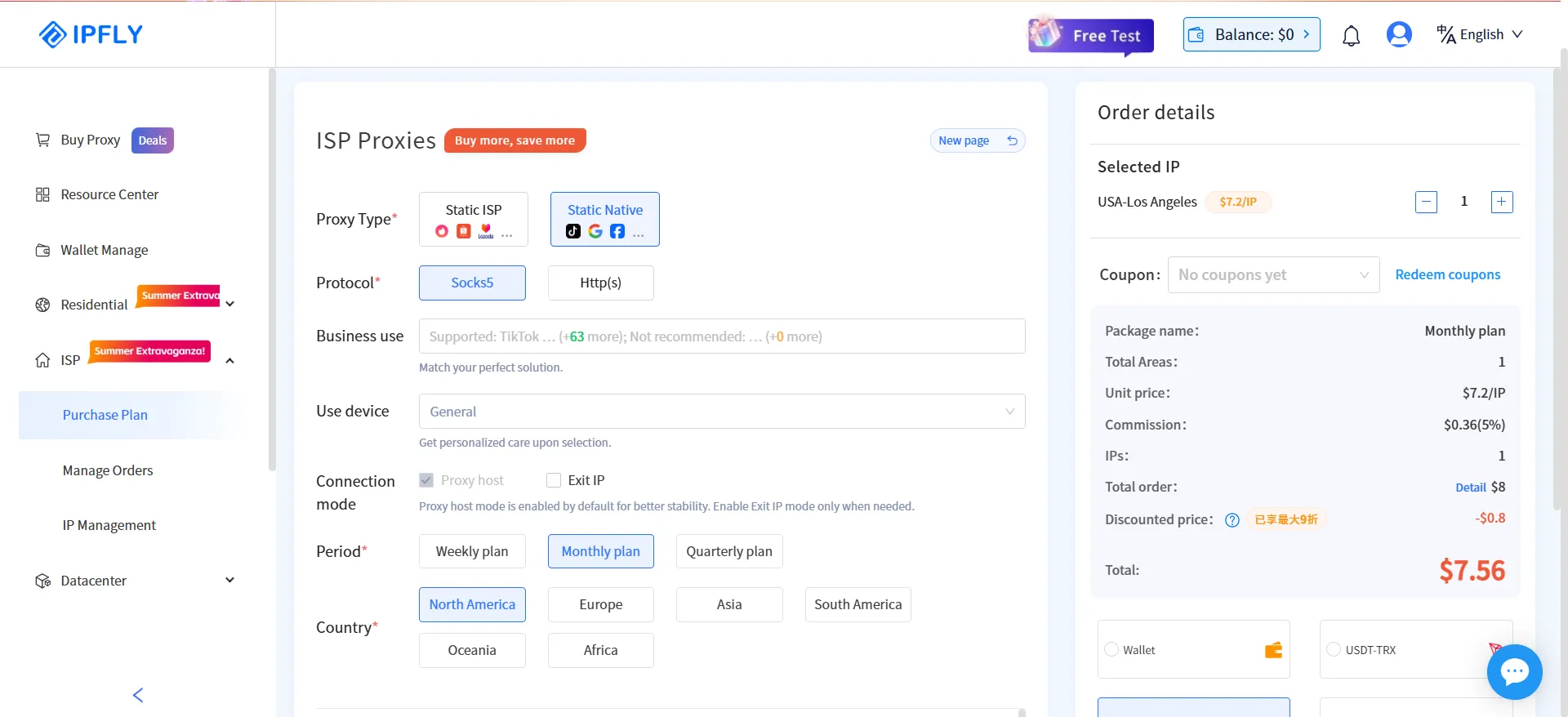
3. Copy the core connection parameters of the agent:
Protocol Type: It is recommended to select SOCKS5 (optimal for Client compatibility and concealment)
Server Address (Host)
Port
Account (Username) / Password (Password)
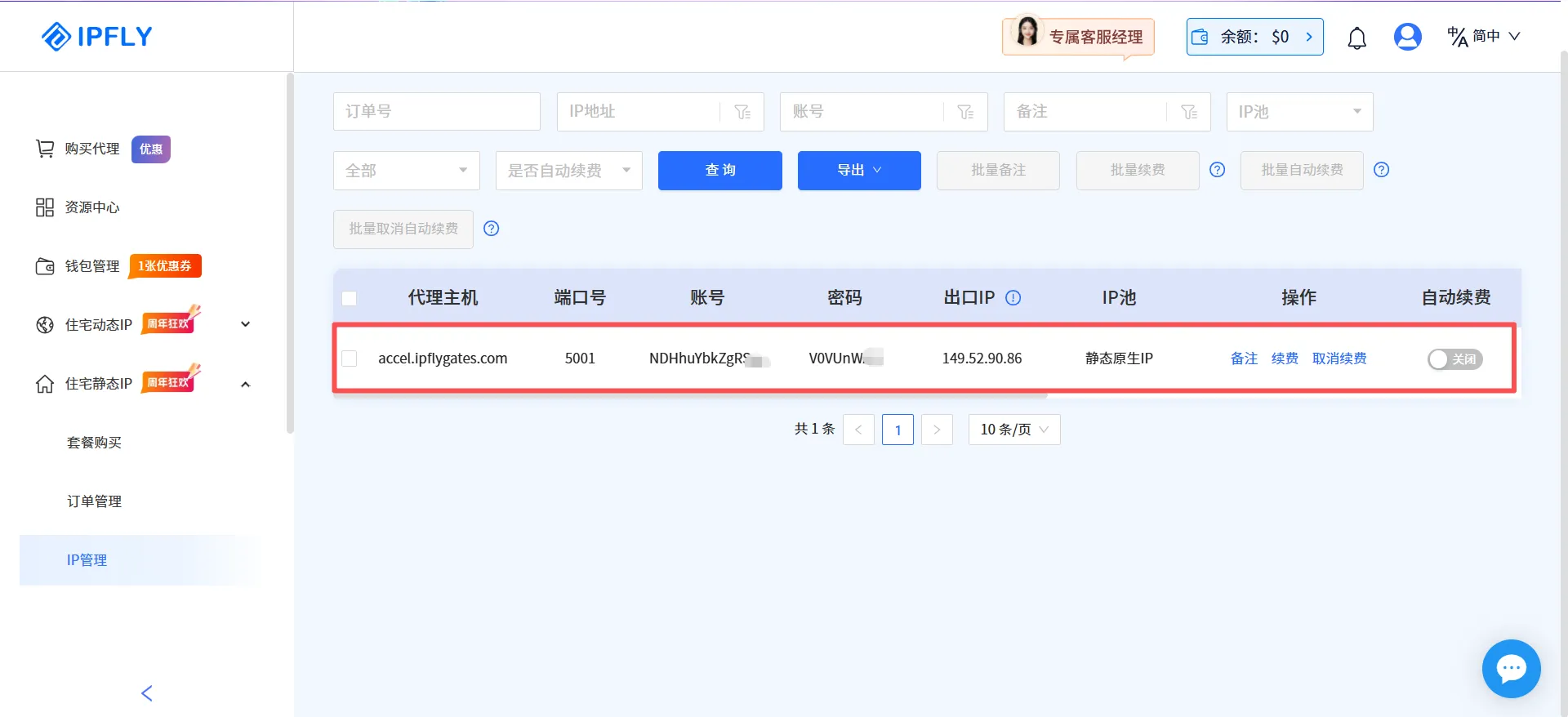
Step 2: Add a proxy IP in the backend of VMOS Cloud
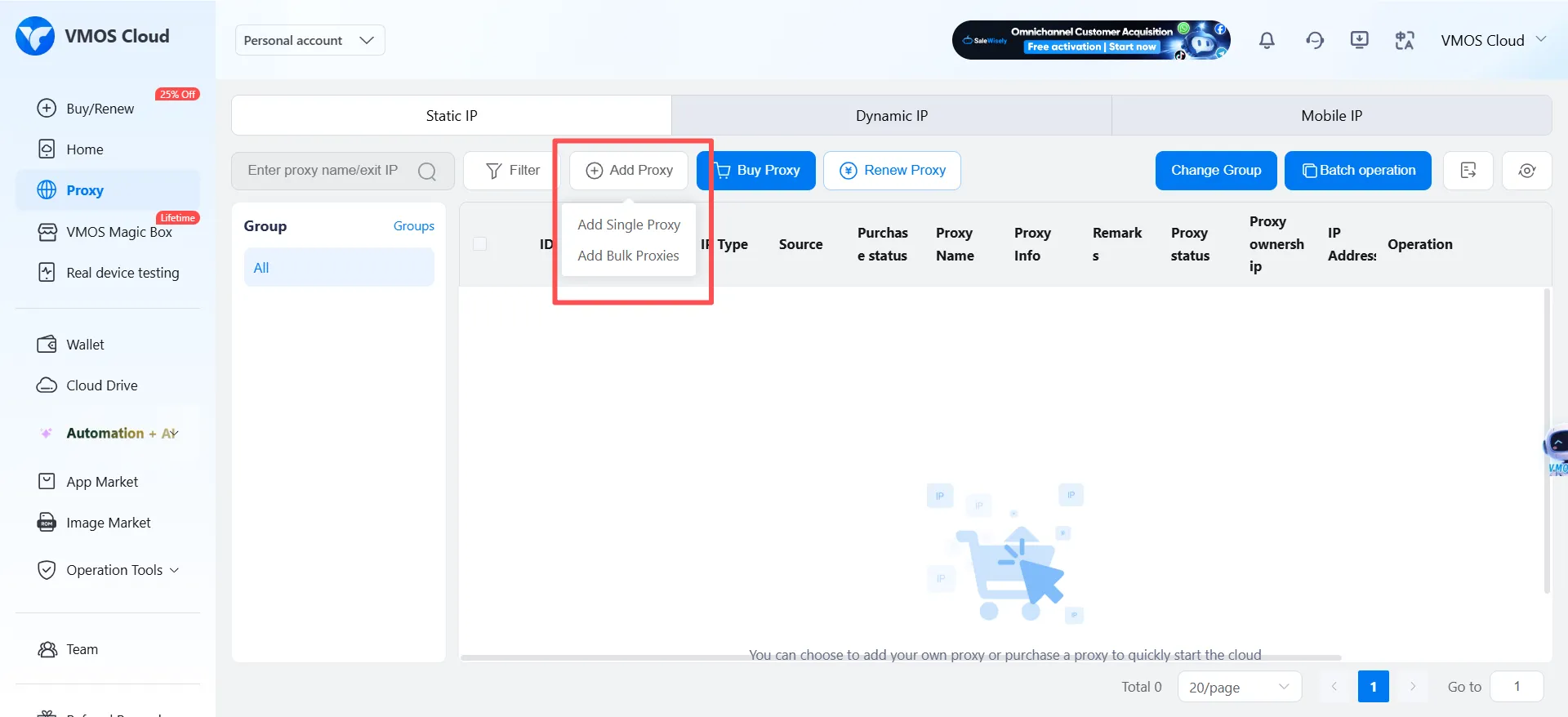
1. Log in to the VMOS Cloud backend and navigate to the [Proxy IP] page in the right navigation bar.
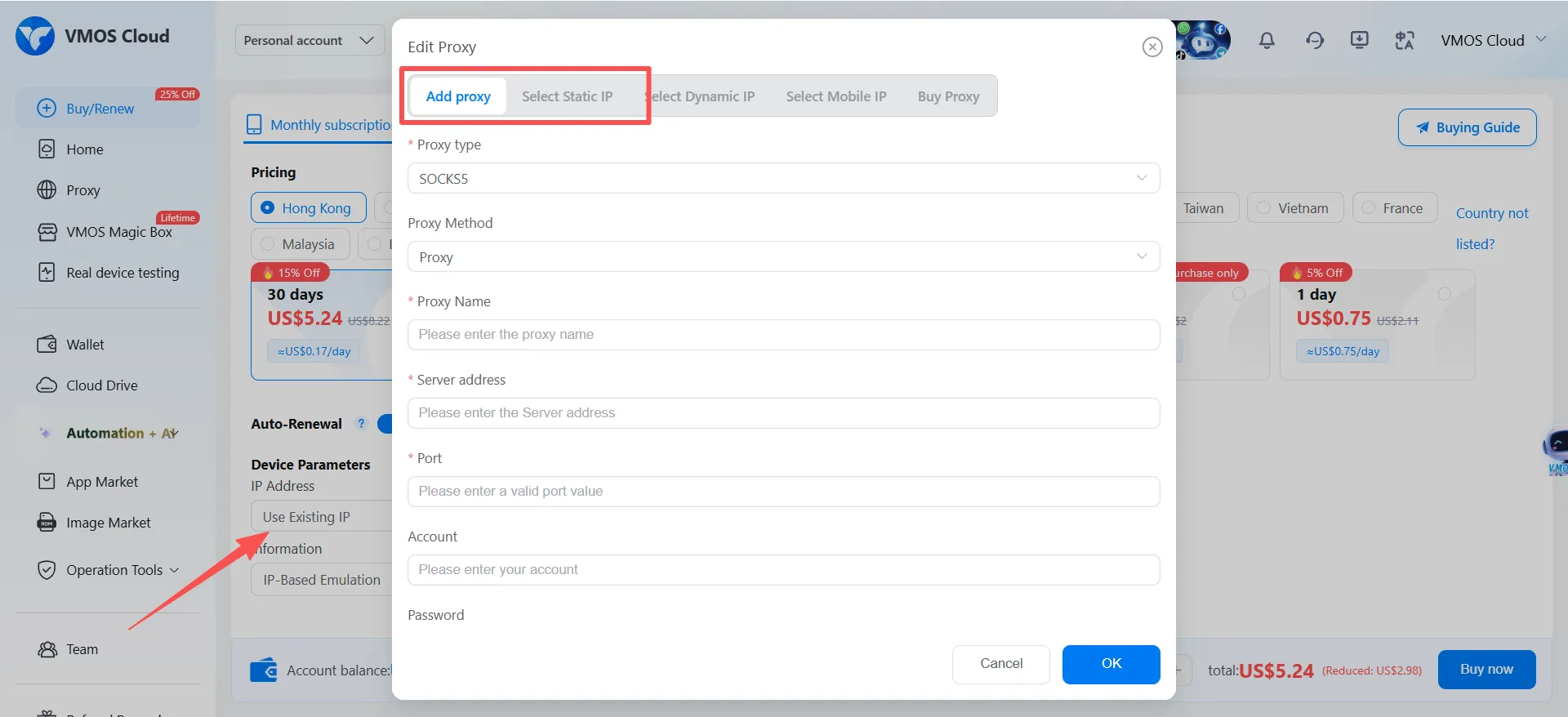
2. Click the [Add Agent] button in the upper right corner, then choose to add agents in batches or individually according to your actual needs.
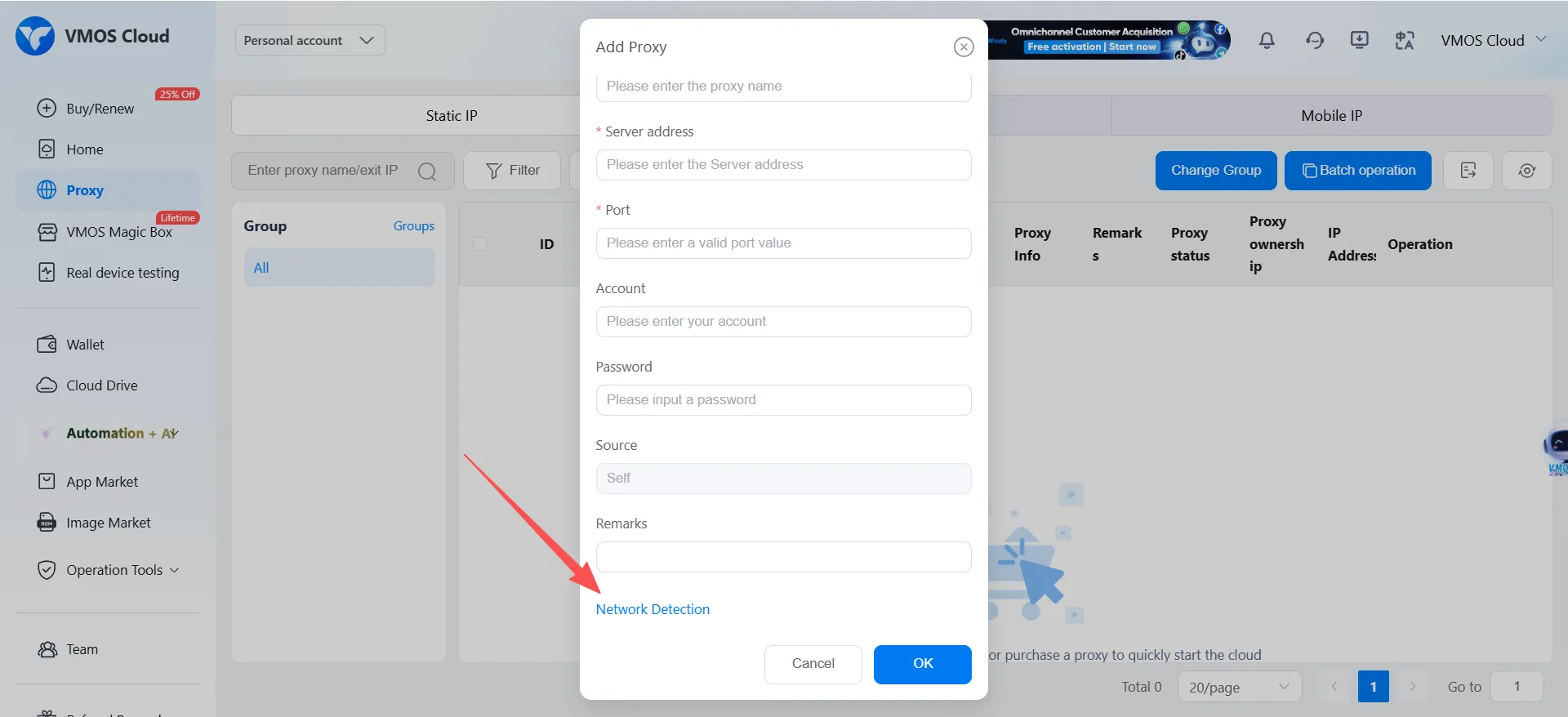
3. Accurately fill in the server address, port, account and password obtained from IPFLY.
4. Click [Network Detection], confirm that the connection is normal and the attribution of the displayed egress IP is consistent with expectations, then save the settings.\
Step 3: Create a cloud phone and bind a proxy IP to it
1. Go to the purchase page of VMOS Cloud and select the appropriate Android system version (high-end real machines+Android 13 is recommended).
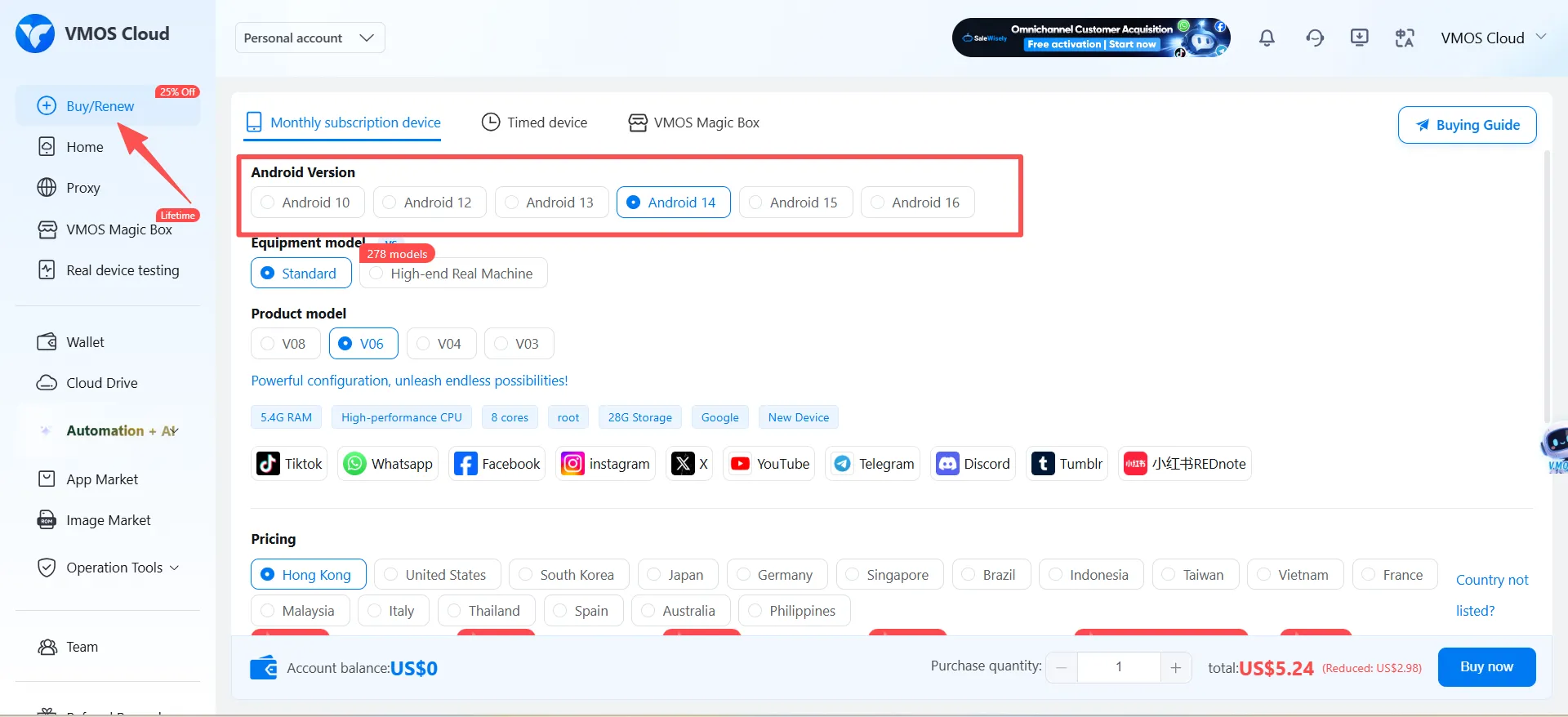
2. In the [Device Parameters] - [IP Address] configuration item, select [Use Existing IP].
3. Tick the IPFLY static residential IP line that you just added and passed the test, or select [Add New Proxy] on this interface, and click [Confirm Creation] after successful addition.
4. Key Configuration: Ensure that the time zone and system language of the cloud phone (e. g., PST time zone and English environment corresponding to a West US IP) are strictly consistent with the IP attribution location.
Step 4: Power-on Consistency Verification
After powering on the device, visit detection websites such as ipinfo. io via a browser, verify whether the IP location, carrier and local time zone are completely consistent, and ensure that the device fingerprint and network identity are logically consistent.
Long-term Maintenance Strategy for IP and Accounts
The core value of static residential proxies lies in "building credibility with a fixed IP", and the following points should be noted in daily operations:
1. Establish a mapping file: maintain a fixed file of "cloud phone number ⇄ static IP ⇄ bound account", and avoid frequently changing the binding relationship.
2. Regular health inspection: Check the reputation status of the current IP on a weekly basis via third-party tools or the IPFLY backend. If abnormal traffic fluctuations or sudden latency spikes are detected, apply for a new static IP in a timely manner.
3. Avoid associated risk pitfalls: In addition to basic environment isolation, attention should also be paid to the differentiation of registration information (mobile phone number, email), payment channels and copy/image creatives, so as to prevent collective punishment caused by to reuse of content or materials.
Summary
TikTok's risk control logic is evolving from "detecting abnormal behaviors" to "verifying the authenticity of digital identities". Leveraging the device environment isolation provided by VMOS Cloud, combined with the clean static residential IPs offered by IPFLY, overseas expansion teams can build a dual security closed loop of "device identity + network identity" for each account. In long-term matrix operation, a robust digital identity infrastructure serves as the solid cornerstone for sustained business growth.For teams expanding their TikTok operations in 2026, this two-tier infrastructure is not an optional extra, but the baseline cost required to stay in the game.
Frequently Asked Questions (FAQ)
Q1: Why is dual isolation of cloud phone + static residential IP mandatory?
A: TikTok checks both device fingerprints and network attribution. Isolating only the device while sharing an IP leads to network-layer correlation; changing only the IP while sharing a device exposes the association via hardware fingerprints. Dual isolation solves both "who I am" and "where I am."
Q2: How do cloud phones differ from Android emulators?
A: Emulators run on desktop PCs and lack real mobile sensors, making them detectable by TikTok's SDK. Cloud phones are complete, standalone Android systems in the cloud with independent kernels and hardware parameters—indistinguishable from real physical devices.
Q3: Why can't I use data-center or dynamic residential IPs?
A: Data-center IPs originate from server farms and are easily flagged. Dynamic residential IPs change frequently, undermining long-term account nurturing and live streaming. Static residential IPs provide a long-term, fixed, authentic home-broadband identity—the optimal choice for building platform trust.
Q4: Can one static residential IP bind to multiple accounts?
A: A strict one-to-one binding is recommended. Multiple accounts share one IP risk collective punishment if one triggers risk control. Maintain a fixed mapping of "cloud phone ID ⇄ static IP ⇄ bound account."
Q5: How do I confirm the environment is properly isolated?
A: After powering on, visit ipinfo.io and verify four items: IP geolocation, time zone, system language, and device fingerprint all align with the target market. Proceed only when all checks pass.



