
DLDR: For most everyday users, creating more than one Instagram account may be simply a way to separate personal life from work or organize different interests. However, for social media marketers, agencies or brands, the meaning of multiple accounts goes far beyond that. It becomes a powerful strategy for expanding reach, targeting specific niches, and mitigating losses caused by account bans. As stated on the official website, Instagram allows users to manage up to 10 accounts on one device and you can refer to following steps to create additional profiles:
Open the Instagram app and navigate to your profile.
Click profile name at the top/Tap the menu icon in the top-right corner and scroll down to find“Settings and privacy”.
Choose “Add account” to “Create new account”
Enter new profile name and password
Click "Continue" and Allow to add the new profile to your Account Center and complete your sign up
To switch and manage between accounts:
Mobile: Tap Profile or your profile picture in the bottom right → Click your username at the top of the screen → Choose the account you'd like to switch to.
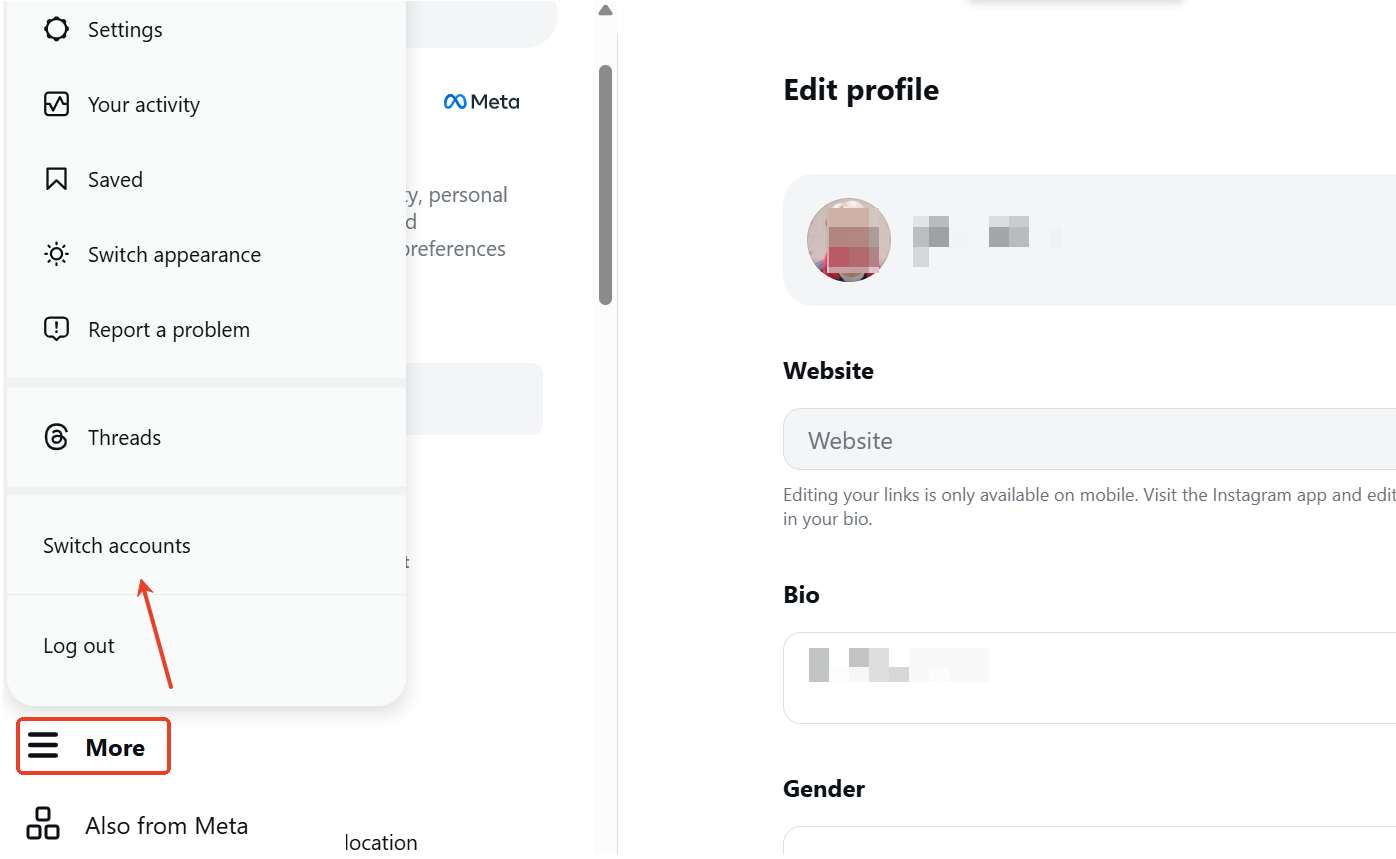
Computer: In the bottom left, click More, then click Switch accounts to choose the account you want.
While creating multiple accounts seems to be easy, managing them safely and at scale comes with several challenges, including frequent verification loops that interrupt access, low efficiency caused by constant switching, increasing content management complexity, and risk of account association and restrictions. That's to say, a secure, clean and isolated environment becomes especially important for stable multi-account management. Android cloud phones perfectly resolve the pain point by providing an independent device environment for each account to reduce the risk of being flagged and minimize security verification as well as account restrictions. In addition, powerful multi-account features streamline workflows efficiently. These make it the best solution to scale Instagram account management safely.
What's the benefit of having multiple Instagram accounts?
Scale marketing reach
A large portion of consumers(around 60%) interact with brand content multiple times per week on Instagram, therefore, maintaining both visibility and a clear brand identity is essential.
Relying on a single account limits reach and can mix personal and business content. Multiple Instagram accounts help avoid the confusion and keep brand credibility and consistency.
Multiple accounts help expand exposure across different campaigns, markets, or customer groups.
Target different niches
Real feedback from Reddit indicates that multiple accounts allow users, social media marketers or businesses to deliver highly relevant content to different segments, improving engagement rates and accounts presence.
Improve/localize communication with customers
72% of Gen Z preferring Instagram for customer care, multiple accounts allow brands to handle inquiries more efficiently and even localize support.
Reduce risk and safeguard business
Given Instagram's importance in customer interaction, losing access to one account can disrupt operations. Having multiple accounts ensures backup and business continuity.
How to create multiple Instagram accounts in 2026 (step-by-step guide)
According to information stated in Instagram’s help center, each user can log in and switch between up to 10 accounts on a single device at the same time. This means that creating and managing multiple accounts is fully supported by the platform as long as it is done within their community standards and does not involve spam-like behavior or abuse of the system. In the following step-by-step guide, we will walk you through how to create and manage multiple Instagram accounts.
Creating multiple Instagram accounts
Step 1: Open the Instagram app and navigate to your profile.
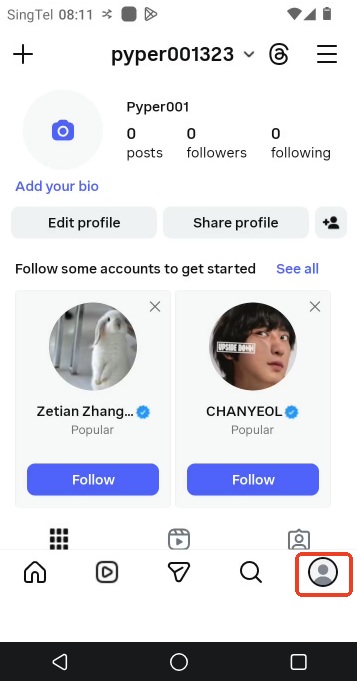
Step 2: Click your profile name at the top or tap the three-line menu icon in the top-right corner and scroll down to find “Settings and privacy”.
Step 3: Choose “Add account” and then select “Create new account”
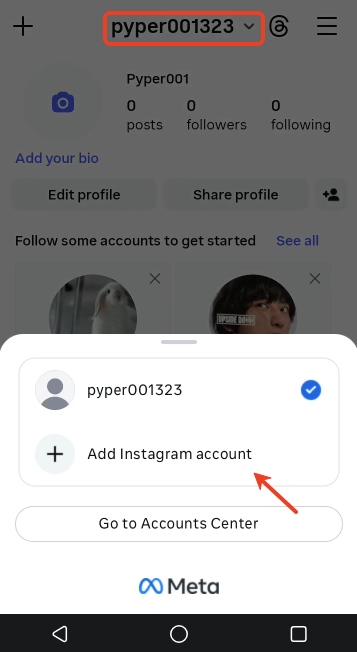
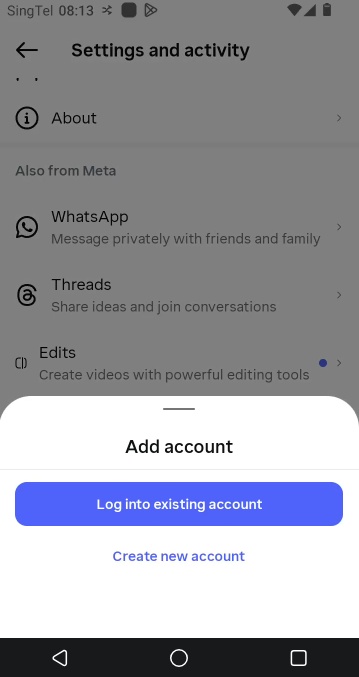
Step 4: Enter your new profile name and password, then tap Next

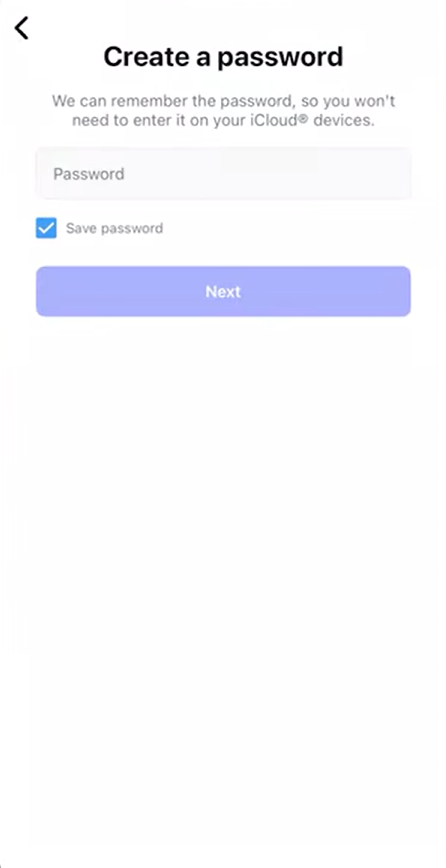
Step 5: Click "Continue" then tap Allow to add the new profile to your Accounts Center
Step 6: Complete your sign up
Switching between multiple Instagram accounts:
Mobile: Tap Profile or your profile picture in the bottom right to go to your profile. → Tap your username at the top of the screen. → Choose the account you'd like to switch to.
Computer: In the bottom left, click More, then click Switch accounts to choose the account you want.
What challenges make you struggle with multiple Instagram accounts?
Verification loops
One of the most frustrating problems users report is getting stuck in verification loops, where Instagram repeatedly asks for identity or security verification during login or account switching. Users attempting to manage multiple accounts at scale often experience repeated verification prompts, especially when login patterns or environments change frequently. This can disrupt workflow and delay account access.
Frequent logging in and out
Instagram allows only a limited number of active accounts (up to 10 accounts logged in at one time). As a result, users managing more accounts often need to constantly log in and out between profiles. This will lead to workflow inefficiency, increased risk of login errors and higher chance of triggering account security verification. For scaling operations, this becomes a major operational bottleneck.
Content overload & management complexity
Managing multiple accounts significantly increases workload. As users note in real-world discussions, manually tracking and updating several Instagram accounts requires a large amount of time and effort, this includes:
Planning content for each account
Tracking engagement separately
Managing posting schedules
Monitoring performance metrics
Without a structured system or professional tool, content management quickly becomes overwhelming.
Account association and restriction
One of the key concerns for marketers or businesses who run multiple Instagram accounts is being detected as account association. Instagram may track accounts based on device, IP address, or behavior patterns. Once accounts are linked, any suspicious activity on one account can potentially affect others, leading to reduced reach, operation restrictions, temporary or even permanent bans. (click here to get detailed information of Instagram account limit and solution)
How to safely manage multiple Instagram accounts?
For users managing only a small number of Instagram accounts, manual operation or common social media schedule management tools (e.g. Meta Business Suite, Buffer, Hootsuite, or Later) are usually enough. However, once you scale to 10 or more Instagram accounts, these methods quickly become insufficient. This is where cloud phone becomes a game-changer. VMOS Cloud serves as a leading antidetect cloud phone solution for managing multiple Instagram accounts, providing a fully isolated mobile-first environment for each account to boost scaled multi-account management and expand social reach while keeping accounts away from bans.
Device-level isolation reduces account linking
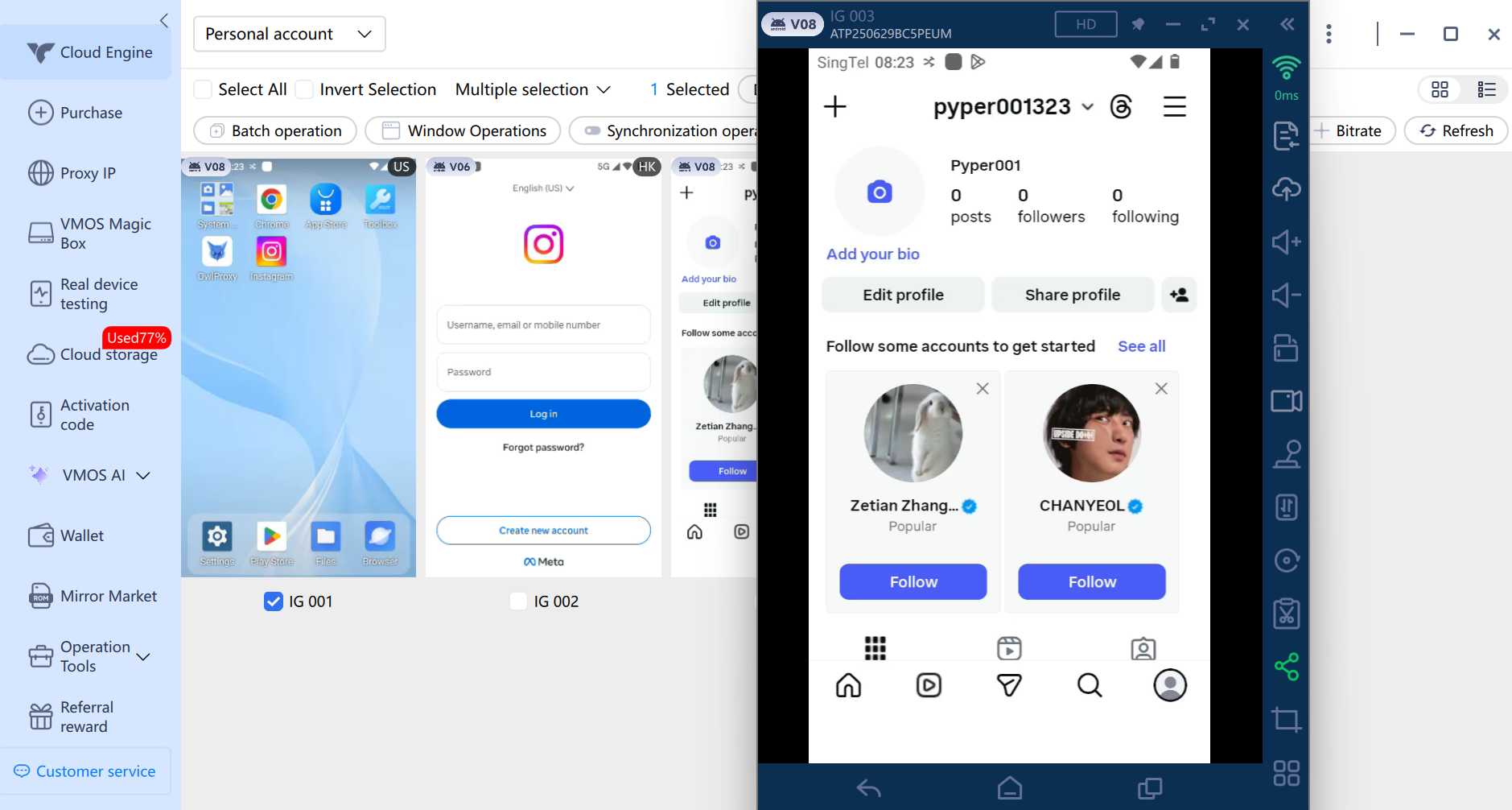
Instead of relying on emulated environments (x86-based virtualization), VMOS Cloud is an ARM-based real-device cloud. It allows each Instagram account to run in a totally independent mobile environment with unique device parameters like device brand, model, Android version(Android 10-16), language, timezone, storage, IMEI, phone number, bluetooth address, network settings. And these device parameters can auto match the IP closely.
Multi-account management streamlines workflow
VMOS Cloud supports users managing multiple Instagram accounts on a centralized dashboard. There is no need for frequent log in and log out or handling accounts one by one, batch operation and synchronizer features allow users to perform batch actions (launch, stop application batch install) and the same actions simultaneously across multiple devices in real time. This not only saves time and effort but also ensures consistency, making large-scale Instagram account management more efficient and scalable.
SMS service benefits account registration
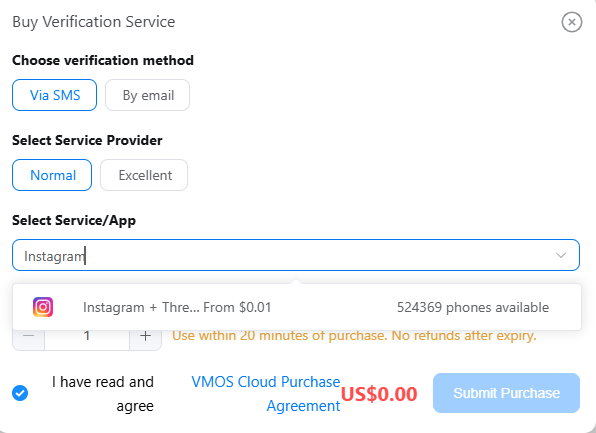
For social media marketers or agencies who need to create multiple Instagram accounts, VMOS Cloud provides built-in Captcha services, including temporary phone numbers and email support. This allows users to complete account verification without relying on physical SIM cards or third-party platforms. By integrating these services into a single environment, users can create accounts and proceed with subsequent operations seamlessly. The all-in-one approach improves registration efficiency and streamlines multi-account management at scale.
FAQs
Can I have two Instagram accounts?
Yes, you can have two Instagram accounts and even more. Instagram allows users to log in and manage up to 10 accounts at one time.
How to add another Instagram account on one device?
Launch Instagram and navigate to your profile, tap the username on the top or menu icon in the top-right corner. Then you will find the option to “Add account”.
What's the point of having multiple Instagram accounts?
It allows users to separate different contents and audiences. For individuals, it helps organize personal life, work, or specific interests, while for businesses and marketers, it enables niche targeting, better engagement, content testing, and scalable growth.
Is it safe to have multiple Instagram accounts?
Yes, it can be safe to have multiple Instagram accounts if you ensure compliance with community standards and behave like a real user on each account. However, Instagram will track account association via device, IP address, behavior patterns. To reduce this risk, using anti-detection cloud phone that provide each account with an independent environment can help improve safety and prevent account restrictions.



