


What is a Facebook bot?
A Facebook bot is a tool that can perform predefined actions on Facebook with little or no manual intervention. The idea behind a Facebook bot is simple: instead of repeating the same steps manually, users can set up a task bot to follow a specific set of instructions and handle routine for them. Facebook bots can serve different purposes, from handling repetitive tasks to supporting broader social media workflows. While their functions may vary, they share the same basic principle: following predefined instructions to complete tasks with less manual input.
As Facebook marketing gets more involved, task bots can provide a practical way to cut off manual effort and streamline day-to-day workflows.
What tasks can a Facebook bot automate?
A Facebook bot can take care of many repetitive actions that follow a clear and predictable process. The exact capabilities depend on the tool and the Facebook environment it works with, common use cases include account management, content distribution and other routine tasks.
Create a totally new Facebook profile
Setting up multiple Facebook accounts can be time-consuming, especially when the same steps need to be repeated. Facebook bots can simplify the registration process and help teams get multiple accounts ready with less repetitive work.
Login
Managing multiple Facebook accounts often means logging in and switching between profiles throughout the day. A task bot can handle these routine tasks, making it easier to access the right account when needed.
Account warm-up
Warm-up a new Facebook is essential before it is used for broader social media workflows. Task bots can take care of this process with regular activities such as browsing content, scrolling, and other basic interactions at scheduled times.
Content distribution
Publishing across multiple Facebook profiles can involve a long list of steps. A Facebook bot can help distribute contents like posts and Reels, making it easier to maintain a steady publishing rhythm across pages.
Message broadcast
Managing customer messages or outreach across accounts can quickly add to the workload. Bots can assist with locating relevant conversations or profiles and sending prepared messages, helping businesses keep their communication moving with less hands-on work.
Why does a no-code Facebook bot make more sense?
For agencies and businesses, automation is an appealing way to streamline workflows and improve efficiency. The idea of building a Facebook bot around specific needs sounds like an ideal solution. However, turning that idea into something that actually works often comes with a technical barrier. Although modern AI tools can help with writing code easily, Although modern AI tools can help with writing code easily, the lack of auditing capability, cost of debugging and maintenance can be enough to stop the team before the bot ever gets off the ground.
Not every Facebook task needs the same level of setup. Sometimes, you just need a template that works out of the box. Other times, you may want to tweak a few steps or build the whole process yourself. And when multiple tasks need to work together, you may desire a way to connect them into one flow. VMOS Cloud covers all three scenarios—from ready-made templates and RPA builder to cloud phone automation workflow. Choose the approach that fits your task, and build from there.
How to build a Facebook bot without Python for your tasks?
Things before building a Facebook bot
Building a Facebook bot is easier when you have the right tool behind it.
If you're handling multiple profiles, the environment they run in matters more than you might expect. Frequently switching or overlapping environments can interrupt routine workflow, make things out of track and may carry potential account red flags.
Businesses can assign a fully isolated environment for each Facebook profile with cloud phone. Based on ARM servers, each cloud phone runs just like a real mobile phone and comes with unique device signals, allowing every Facebook profile to behave like a real user and avoid having everything mixed together.
Step 1: Head to VMOS Cloud to sign in, or download the app to your preferred device (Windows, macOS, Linux, Android, iOS supported) and log in.
Step 2: Configure cloud phone for your Facebook accounts
Go to the "Buy/Renew" interface and purchase cloud phone as per need. (High-end real machines are more recommended for more authentic experience)
Customize the setup of your device:
Android version: Android 10-17
device brand and model
IP address: select a region and use it for free or assign unique proxy IP to each cloud phone
Step 3: Get your Facebook accounts ready
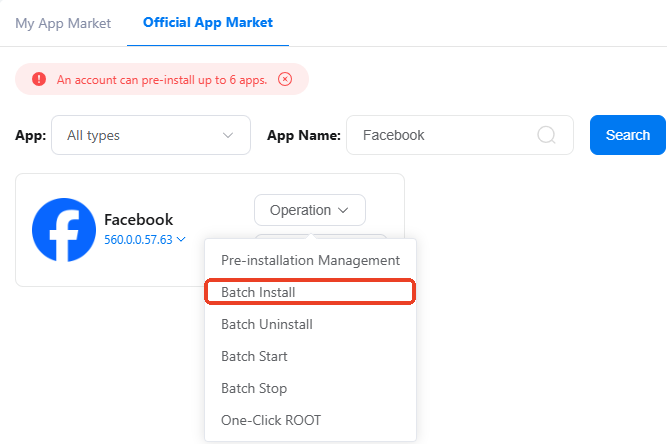
Install Facebook from built-in App Store, or go to Official App Market and batch install Facebook to multiple devices.
Enter cloud phone and log in to your Facebook accounts, or let VMOS Cloud handle this part for you with Facebook 2FA Login template.
Ready-made templates: Start with what you need
No need to be a developer to get started. Users can use VMOS Cloud's ready-made templates for common Facebook workflows with minimal setups.
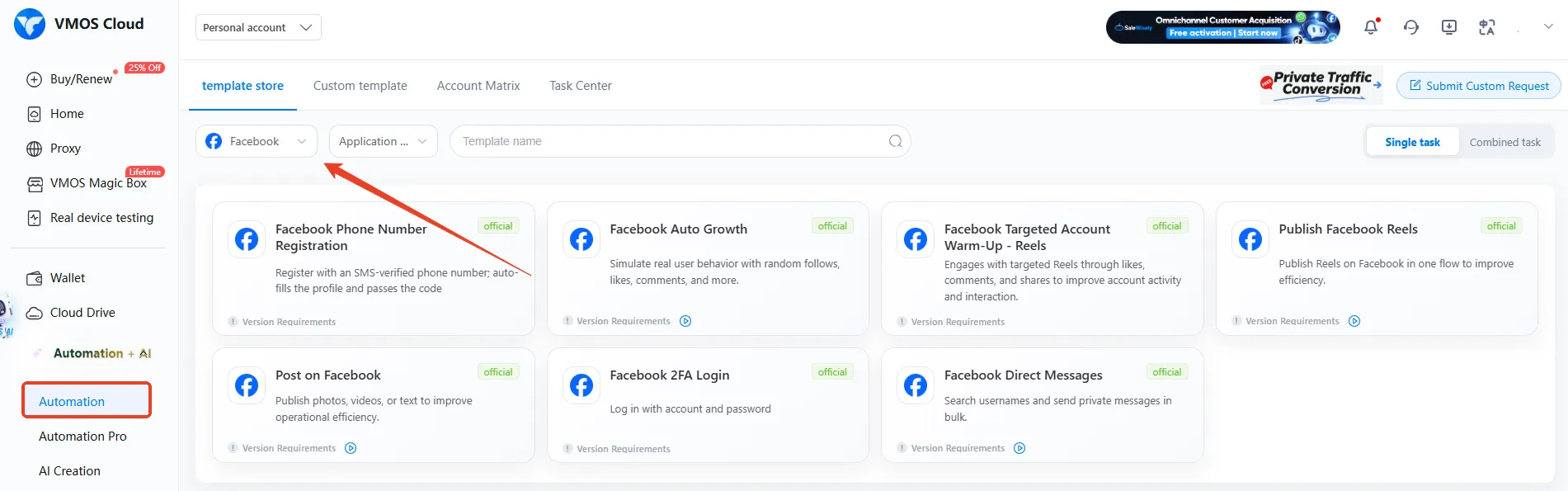
Find Automation in the left sidebar, navigate to template store and select Facebook from the dropdown menu.
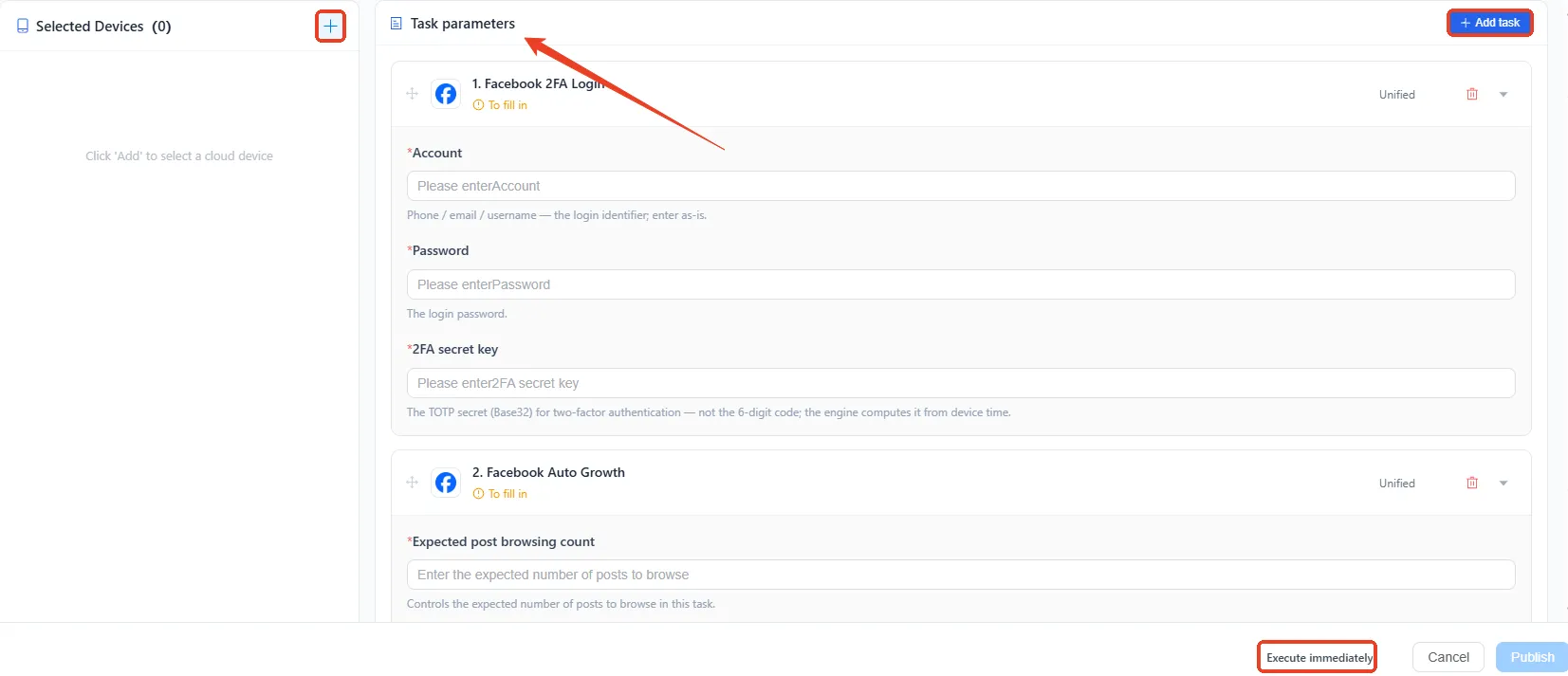
Select one or several required workflow, complete task parameters and add the devices that need to run the task.
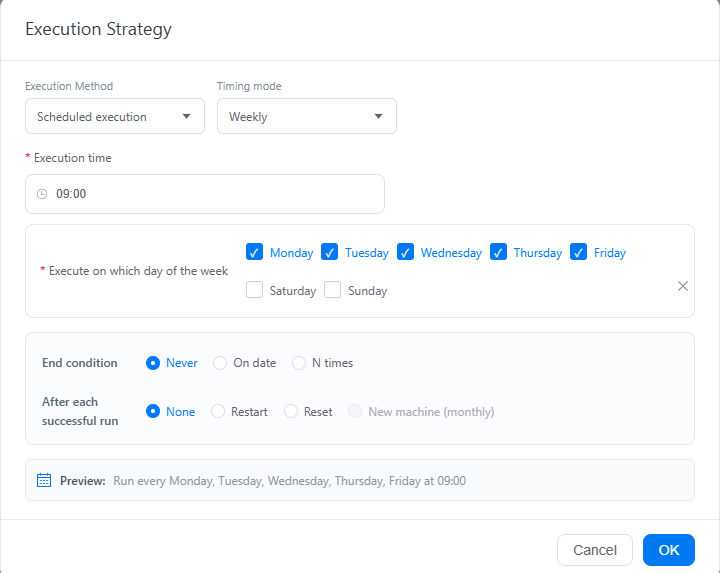
Smart scheduling offers more flexibility to let tasks go live immediately or execute at optimal scheduled time.
RPA builder: Custom your own workflows
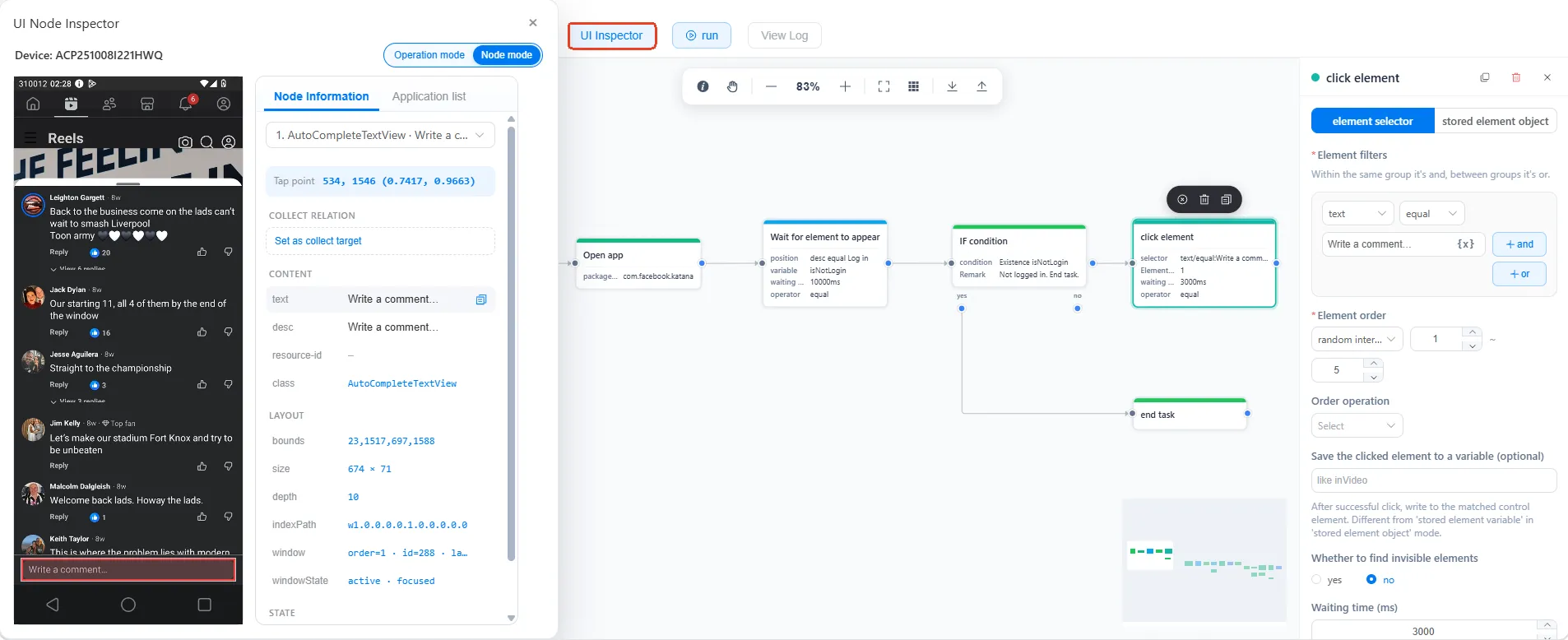
Facebook workflows can change, and so can your requirements. If an existing template doesn't quite fit your needs, VMOS Cloud also provides a drag-and-drop RPA editor, with which you can build your own workflow by arranging the actions you need—no coding required.
Adjust based on preset templates
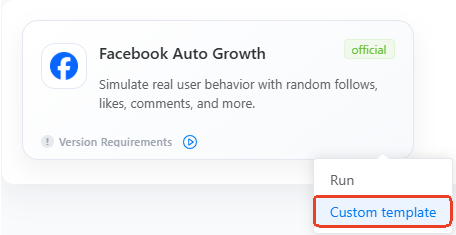
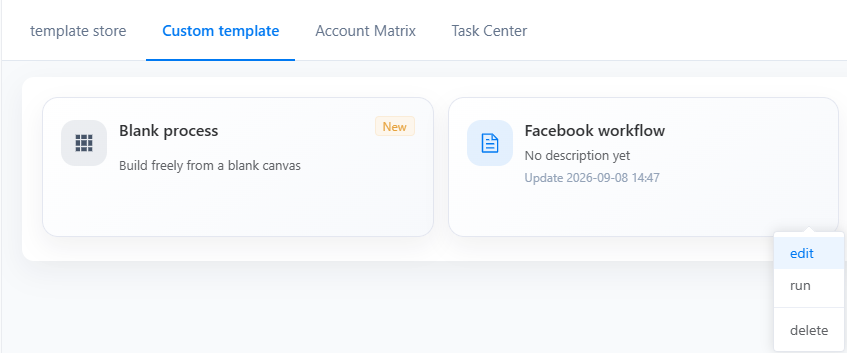
If a ready-made template is close to what you need, you can click the Custom template and tweak the actions, sequence, or settings in canvas to create a workflow that better fits your task.
Build from scratch
For more specific requirements, you can start with a blank canvas and build the workflow from the ground up. Simply drag and drop the actions you need, connect them in the right order, and create your own Facebook bot without coding.
Cloud phone automation workflow: End-to-end task orchestration
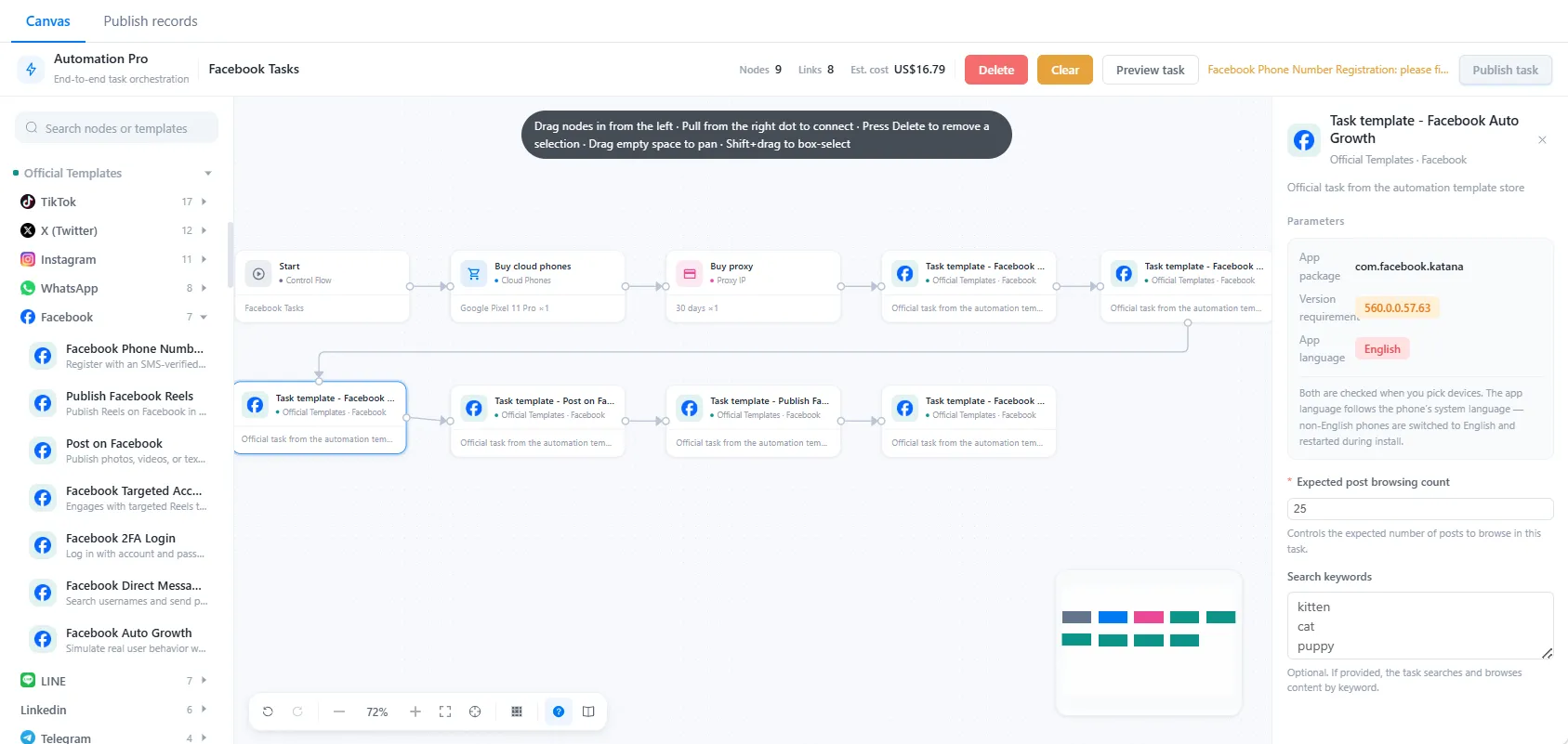
Running Facebook often involves more than just opening the app and clicking through a few steps. Prepare a device environment, set up a proxy, log into Facebook and configure specific tasks —— rotating each point separately can quickly become a hassle.
VMOS Cloud Automation Pro brings these moving parts together, allowing you to connect cloud phone actions, proxy settings, Facebook tasks into one end-to-end workflow. Set up the flow once, and let your cloud phones handle the process from start to finish.
Let Facebook bot work for you now
Once the tasks are ready, there's not much left for you to do. Set the workflow in motion, and VMOS Cloud can take it from there—following the steps you've set up and handling the task while you get on with other work.
Think of it as handing a checklist to a virtual assistant. You decide what needs to be done and how it should run; the bot takes care of the rest. And you can track the running status effortlessly in the task center.



