
DLDR: Short videos like Reels is an attractive way to reach target users, increase engagement and gain followers for Instagram marketers. Automating Reels posting helps reduce repetitive manual work, ensures consistent publishing, and provides a streamline way to upload videos in bulk especially when managing multiple accounts.
Practical methods to automate Reels video posting:
Instagram built-in scheduler: Allow users to schedule Reels posting within the Instagram app. Free and easy-to-use but limited to basic functions, only for public accounts, and has restrictions on posting volume and ahead time period.
Social media management tools (e.g. Buffer, Later, Hootsuite): Help schedule and auto-post reels across multiple accounts, but they usually require paid plans and offer limited automation beyond scheduling and performance tracking.
Third-party automation platforms (e.g. Make, Zapier, n8n): Enable highly customizable automation workflows but require technical setup and may carry risks if automation behavior becomes unnatural or overused.
Android cloud phone supports automation: VMOS Cloud provides a streamlined solution to help users bulk posting IG Reels. Use preset AI-powered templates to automate reels-posting workflow.
Compliance Note:
Please always follow Instagram's community guidelines and avoid overused or unnatural automation to start your social marketing strategies.
Why does Instagram reels video matter today?
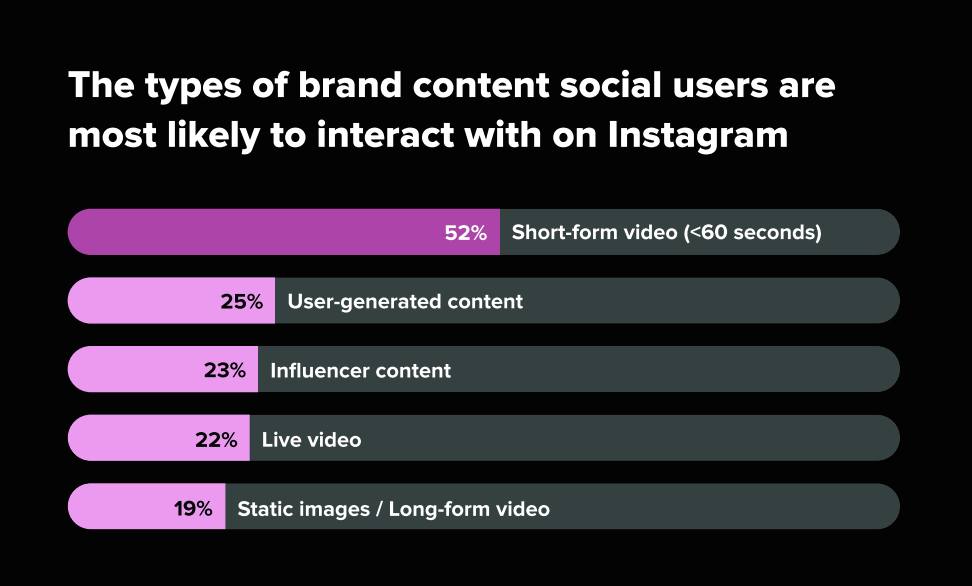
If you're trying to grow on Instagram in 2026, one thing is clear: Reels are no longer optional—they are the engine of organic reach. According to recent social media trends, more than 50% of the brand content Instagram users are most likely to interact with is Reels, making short-form video the dominant engagement driver on the platform. At the same time, Reels accounted for over half of all ads shared on Instagram in 2025, showing that brands are increasingly prioritizing video-first strategies. Compared with static images or traditional feed posts, Instagram Reels are heavily prioritized by the platform's recommendation algorithm. Users are significantly more likely to engage with short-form video through likes, comments, shares, and saves. For creators, marketers, and businesses, consistently publishing Reels is no longer just a content strategy—it has become essential for visibility, audience growth, and staying competitive on Instagram.
How IG Reels help to gain followers?
In today's social media landscape, short-form video has become the dominant content format. As user attention spans become shorter and content consumption becomes increasingly mobile-first, platforms are prioritizing fast, engaging videos over traditional formats. Instagram Reels, as Instagram's native short-form video feature, is designed to match these changing user habits—making it one of the most powerful tools for audience growth on the platform:
Increase content discoverability
Unlike traditional posts that mainly reach existing followers, Reels can appear on the Explore page and Reels feed, helping your content reach users who have never interacted with your account before.Capture attention more easily
Compared to static images or text-heavy posts, Reels combine video, audio, text overlays, and effects, making content more engaging and easier to consume in a short amount of time.Showcase personality and build trust
Reels make it easier to show behind-the-scenes content, tutorials, product demos, or storytelling, helping creators and brands build stronger connections with potential followers.Encourage consistent audience growth
Publishing Reels regularly keeps your content visible and increases the chances of attracting new followers over time, especially when paired with trending topics or sounds.
Why does a streamlined Reels-posting workflow matter more than ever?
While Instagram Reels offer massive growth opportunities, posting them consistently is often easier said than done. To stay competitive, brands and creators are expected to publish Reels regularly—sometimes daily—to keep up with trends, maintain visibility, and maximize engagement. But manually uploading videos, writing captions, adding hashtags, and posting at the right time can quickly become repetitive and time-consuming, especially for businesses managing multiple accounts or large content calendars.
This is where Instagram Reels automation becomes increasingly important:
Get rid of time-consuming manual work
Batch schedule content for an entire week or month in advance, reducing repetitive posting tasks.Post at the optimal time for engagement
Automation tools help your Reels go live when your audience is most active—even late at night or across different time zones.Maintain consistency
One of the biggest reasons accounts fail to grow is inconsistent posting. Smart scheduling and automated posting ensures your content calendar stays on track.Scale multi-account management
For agencies, brands, or affiliate marketers managing multiple Instagram profiles, automation makes it possible to handle Reels publishing at scale.Inspire workflow efficiency
Instead of spending time on repetitive uploads, teams can focus on higher-value work like content creation, audience engagement, and strategy.
How to automate reels posting on Instagram in 2026?
1. Built-in scheduler on Instagram
Instagram allows public Instagram accounts to schedule Reels directly within the Instagram application.
How it works?
Step 1: Tap Create in the top left/swipe right anywhere in Feed → choose Reel.
Step 2: Select a video → tap Next.
Step 3: Add a caption, effects, or filters.
Step 4: Tap More options.
Step 5: Turn on Schedule this reel, then choose a date and time
Step 6: Tap Done.
Step 7: Tap Back.
Step 8: Tap Schedule to schedule the Reel.
Pros:
Free and native: No need for third-party tools, fully integrated with Instagram.
Easy to use: Simple interface for scheduling content.
Organized content workflow: Plan Reels in advance to save time and stay organized.
Cons:
Limited to Instagram public accounts
Users can only schedule up to 25 posts per day and up to 30 days in advance.
Only basic scheduling features, lacks advanced analytics, bulk uploads, or content libraries.
2. Social media schedule management tools
Social media management tools like Buffer, Later and Hootsuite can help automate Instagram Reels posting by connecting to Instagram API. They allow you to schedule content in advance, manage multiple accounts, and track performance from a single dashboard.
Pros:
Manage multiple accounts easily: Ideal for creators, agencies, and brands handling several Instagram profiles.
Advanced scheduling features: Plan Reels weeks or months ahead with drag-and-drop content calendars.
Analytics and insights: Track engagement, best posting times, and content performance.
Cons:
Subscription costs: Most advanced features require paid plans.
API limitations: Some tools may have restrictions due to Instagram's API policies.
Limited automation depth: Mainly focused on scheduling rather than fully automated workflows.
3. Third-party automation tools
For advanced users, agencies, or businesses managing high-volume Instagram accounts, automation platforms like Make, Zapier, and n8n allow building custom workflows for Instagram Reels automation.
Pros:
Highly customizable workflows: Create automation tailored to your content process.
Save manual effort: Automatically trigger posting workflows based on predefined actions.
Scalable for teams and agencies: Ideal for managing large content pipelines or multiple campaigns.
Reduces repetitive tasks: Streamline approvals, content organization, and publishing.
Cons:
More technical setup required: Require workflow building or basic automation knowledge.
Overused automation or activities that do not comply with platform guidelines will make account behavior appear unnatural, triggering platform detection and resulting in account flags.
Potential risks: Rely on scripts and third-party tools, carry the risk of data leakage or security breaches.
How does cloud phone help to automate Instagram reels video posting?
Above three methods can help automate Instagram Reels posting but each comes with its own trade-offs. Instagram’s built-in scheduling feature is simple and free, but it offers limited flexibility for scaling. Social media schedule management tools provide better planning and analytics, yet weak in advanced automation features. Meanwhile, automation tools like Make, Zapier, and n8n offer more advanced workflows, but require a long learning curve and carry potential risks.
So what is the right option for creators, marketers, and businesses looking for more safe, flexible and scalable Instagram automation? Cloud phone with automation features provide the answer, allowing users to run Instagram safely in a real Android environment and automate reels video posting workflows more naturally.
Clean and isolated environment for each Instagram account
VMOS Cloud is based on a real ARM server, providing an authentic mobile-first environment for Instagram profiles just like a physical smartphone. This is particularly well-suited for Instagram Reels, which are more friendly with mobile application and perform better in a native mobile environment.Flexible and advanced social media automation
VMOS Cloud automation is not limited to basic scheduling—it offers a highly flexible automation layer that can adapt to different user needs. With support of AI agents, users can simply transfer text prompts to executable actions. RPA automation allows users either use preset templates or build custom workflows without any coding knowledge. This makes it easy for beginners to set up automated Instagram Reels posting in just a few steps. For users with more advanced requirements, open API is also available, enabling deeper integration automation stacks.High scalability for multi-account management on Instagram
Marketers and large-scale businesses can manage multiple Instagram profiles simultaneously on a single dashboard without manually switching devices. While the fully isolated environment adds a security layer to reduce the risk of account restriction.
Step-by-step guide to publish Reels video with VMOS Cloud
Step 1: Go to VMOS Cloud official website to sign in and purchase your cloud phone.
Step 2: Install the required version of Instagram and log in to your account. (You can check the version requirement in the template store)
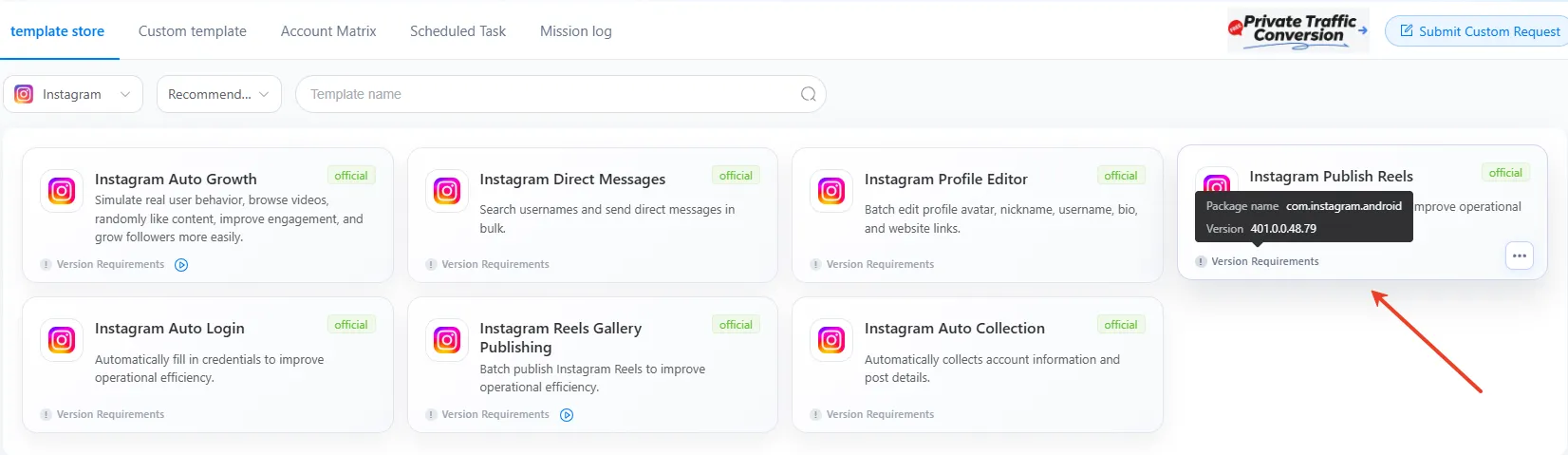
Step 3: Tap “Instagram Publish Reels” in template store and complete task parameters
Click “Add to” to select target device(s)
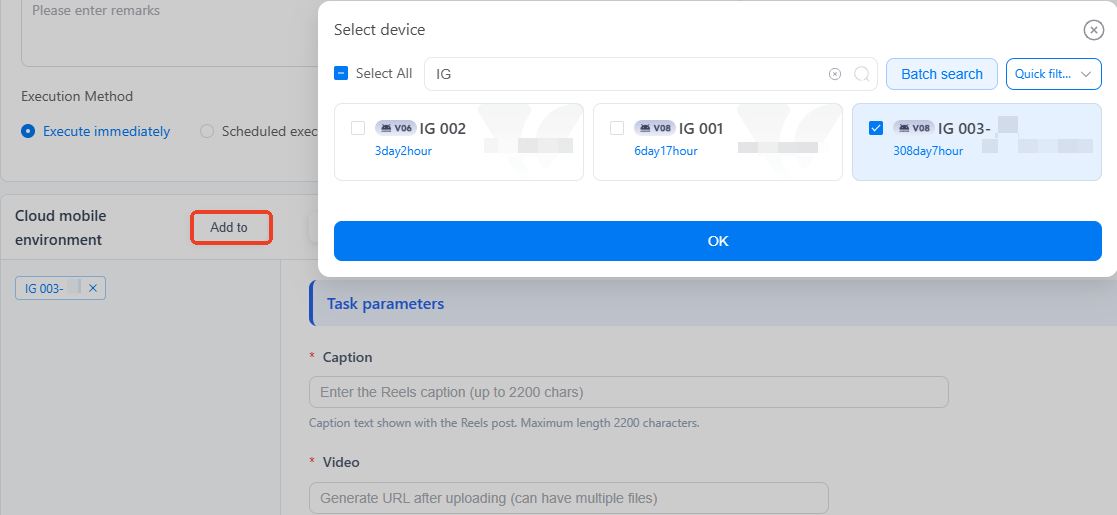
Complete task parameters like caption, video files,audio and volume etc.
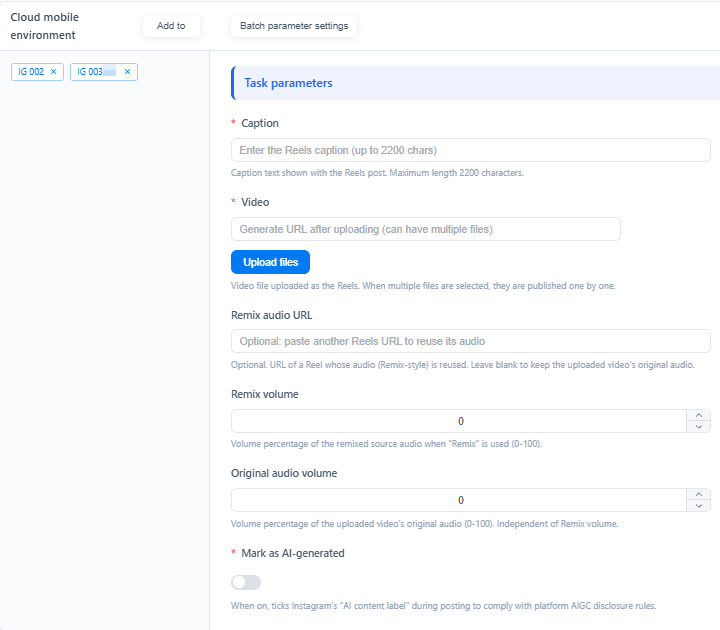
If there are multiple devices, go to Batch parameter settings and finish the configuration of all the devices.

Step 4: Set up optimal time by smart schedule feature
VMOS Cloud provides flexible Execution Mode, users can run the task immediately after completing the configuration or customize execution frequency, date, and specific time to the task under the Scheduled execution.
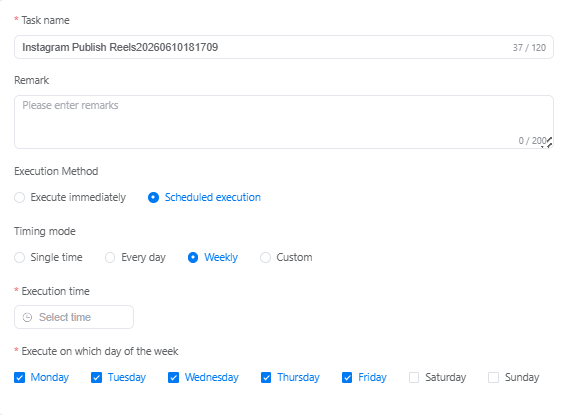
Step 5: Click “Publish” to run the task and track the status via mission log.
FAQs
How to schedule and auto-post Reels on Instagram?
You can schedule and automate Reels posting by built-in Instagram scheduler, social media schedule management tools, automation tools or cloud phone with automation features.
How can businesses use Instagram Reels for marketing?
Businesses can automate Reels posting to save time, improve customer reach and engagement, maintain consistent publishing, streamline workflows across multiple accounts, and focus more on high-value marketing tasks.
How far ahead can you schedule a reel on Instagram?
You can plan Reels up to 30 days in advance by using Instagram's native scheduling feature.
Is automating Instagram Reels safe for my account?
To automate Instagram Reels posting safely, the first thing is ensuring compliance with community standards of Instagram all the time. And VMOS Cloud can act as your best tool to combine fully isolated device environments with advanced automation features. By simulating real user behavior, it reduces the risk of being detected by Instagram's algorithm.



