TikTok's native scheduler enables simple set up for posts calendar:
Head to TikTok web → TikTik Studio, or download TikTok Studio app
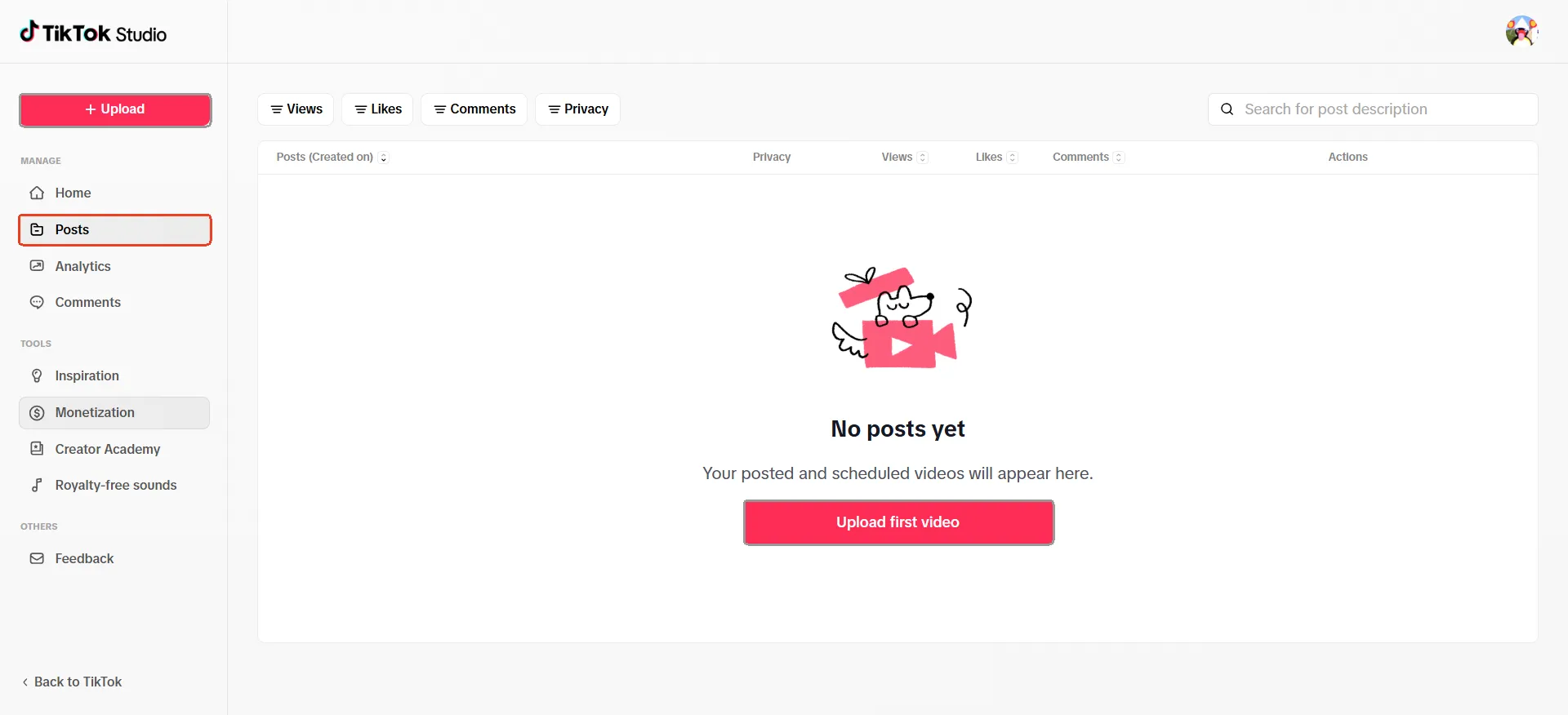
Click Upload to upload the videos, complete the post details, choose a publishing time, and confirm the schedule.
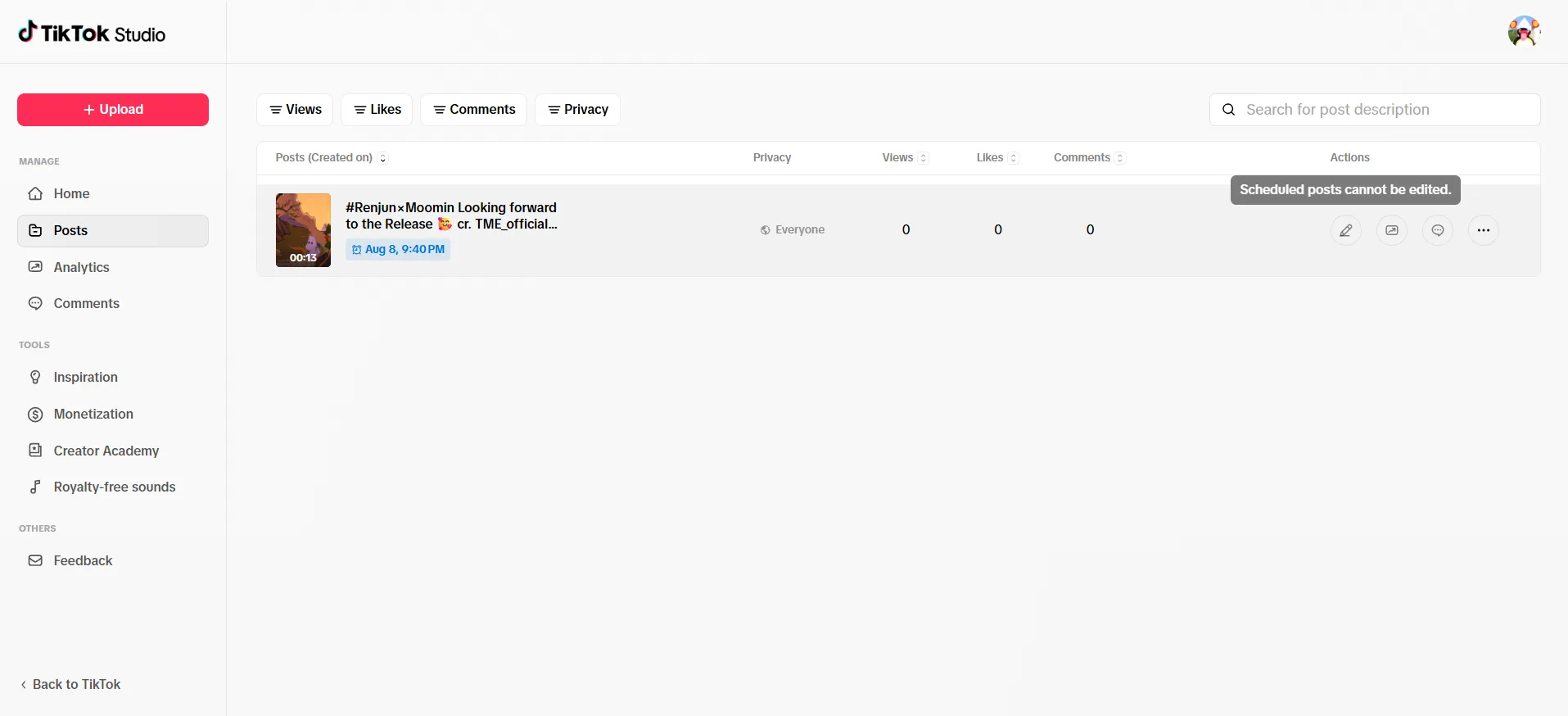
Track the status of the task on the Posts interface
While TikTok's native scheduler works well for individuals and small teams, managing contents across multiple accounts goes beyond simply scheduling. Cloud phones combine an isolated mobile-first environment and smart TikTok posting workflow, helping businesses scale content distribution more seamlessly and effortlessly.
TikTok: The new gateway to global content distribution
As people spend more time interacting with the digital world on mobile devices, the way they discover and consume content has changed dramatically. Instead of relying on manual search, users increasingly prefer catching up trends through personalized algorithm-driven feeds. Short videos perfectly fit this new consumption habit. Quick, engaging, and easy to digest, they allow users to explore creatives, brands, and hits within seconds. As a result, short video has evolved from a simple entertainment format into one of the most powerful touchpoints to reach online audiences.
Among mainstream social media platforms, TikTok is a major gateway for global content distribution. With more than one billion users worldwide, TikTok has built a massive ecosystem where content can travel beyond an account's existing followers and reach audiences based on interests, behaviors, and engagement. This discovery-driven model has changed how businesses approach content distribution. Instead of relying on a single channel or audience base, brands and creators are increasingly using TikTok to test different content strategies, enter new markets, and connect with diverse audiences around the world.
Keeping content flowing: Why TikTok posts scheduling matters?
Keep a consistent publishing rhythm
Consistency is secret for building audience connections on TikTok. Regular posting helps creators, marketers and brands stay visible while giving audiences more opportunities to discover and engage with their content. Instead of editing and publishing content at the last minute, scheduling allows teams to organize upcoming content in advance and maintain a steady publishing cadence.Reach audiences at peak hours
Audience activity can vary depending on location, time zone, and user behavior. For creators targeting audiences across different regions, publishing at the optimal time can help content reach viewers when they are most active. TikTok schedule posts support creators to better align their content with audience habits and different campaign timelines.Free from heavy manual workload
Content distribution on TikTok requires routine steps, including uploading videos, adding captions, adjusting settings, and monitoring posts. Scheduling helps streamline this process by preparing contents ahead of time, cutting off repetitive tasks and giving creators and teams more time to focus on content strategy and optimization.
How to set a scheduled post on TikTok?
TikTok's built-in scheduling feature allows users to upload videos and set a specific publishing time in advance. This provides a simple way for creators and small teams to maintain a consistent posting schedule without manually publishing every video.
How does it work?
Step 1:
Log in to your TikTok account on your desktop browser and head to TikTok Studio under the more option
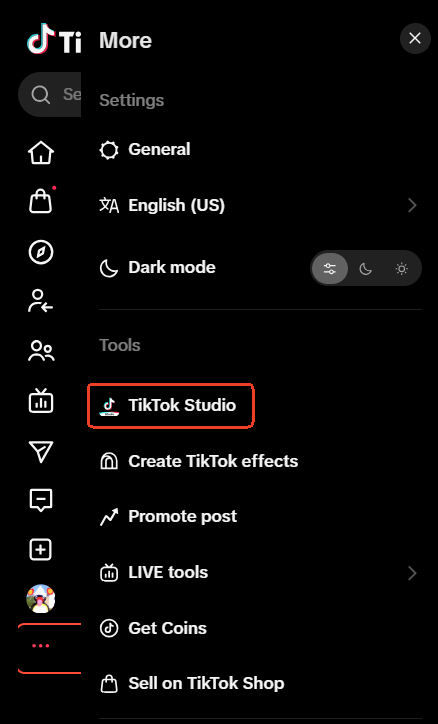
Or download the TikTok Studio app and log in.
Step 2: Click the + Upload in the top left corner or simply draft your content through Posts page.
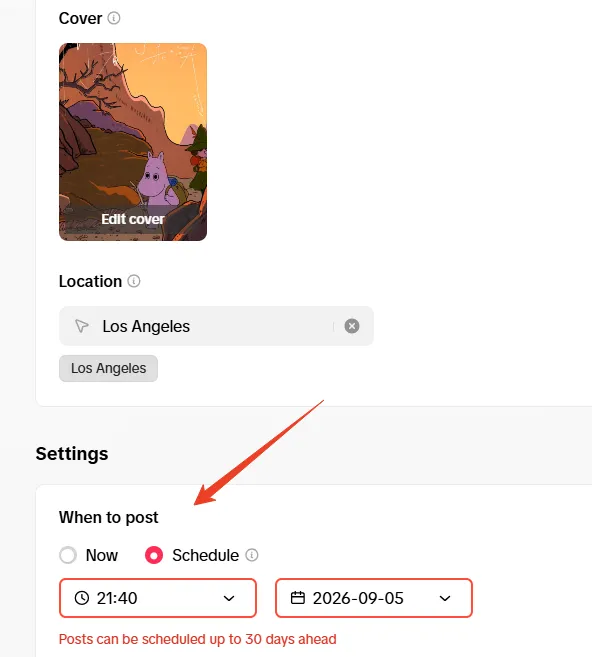
Step 3: After uploading the video and complete details (e.g. description, hashtag, cover, location), scroll down to the Settings part to decide when to post the content.
Note: Posts can be scheduled up to 30 days ahead
Step 4: Check the scheduled post on the Posts interface.
Pros:
Native TikTok feature — It's built directly into TikTok's ecosystem, users can schedule content without relying on third-party platforms.
Simple and easy to use — The workflow is straightforward and requires minimal setup, making it suitable for users managing a small number of posts.
Cons:
Desktop access or a separate app required— TikTok Studio scheduling is available through the web version or the TikTok Studio app. The web-based workflow does not fully align with TikTok's mobile-first experience, while the additional app adds extra steps to the process.
Limited scheduling window — Scheduled posts can only be set up up to 30 days in advance, making it harder to plan and manage content calendars across multiple accounts.
No post editing options after scheduling — Once a post has been scheduled, users cannot edit the scheduled content. If changes are needed, the scheduled post may need to be deleted and recreated.
Why does cloud phone beat traditional scheduler for scheduling TikTok posts across multiple accounts?
Social media schedule management tools (e.g. Hootsuite and Buffer) can take care of some important parts of TikTok content distribution to help creators and businesses organize content calendars, schedule posts, and manage publishing workflows across social platforms. For creators, small teams, or businesses managing a limited number of accounts and contents, these tools provide a convenient way to plan content ahead and maintain a consistent posting pace.
However, TikTok operations become more complex when content needs to be distributed across hundreds of profiles. At this stage, things go beyond simply scheduling and publishing. Businesses also need to consider how to stay each account under radar and keep long-term content distribution in track.
Schedulers are designed more around content planning and publishing, but they do not provide an isolated environment for each account. For agencies, brands, and businesses managing multiple accounts at scale, a solution that combines smart scheduling with an isolated environment is the secret for sustainable growth on TikTok.
Give every TikTok account its own operating environment
Cloud phone provide isolated environments with unique device signals (e.g. OS, IMEI, storage, language and time zone) for different TikTok accounts, making large-scale content distribution more organized and efficient. Instead of switching frequently across multiple accounts on the shared device, businesses can maintain independent presence for different accounts, regions, or content strategies. The device-level isolation also brings benefits to cut off the possibility of account linkage and red flags.Stay true to TikTok's mobile-first experience
TikToks user experience is closely tied to mobile usage, where users discover, watch, and interact with content through the app. With TikTok reaching more than 1.3 billion users worldwide, its mobile ecosystem continues to play a major role in global content distribution. Cloud phone perfectly fit the trend and provide a mobile-first environment closer to the native app experience for a more authentic experience.Beyond planning: building a smarter content distribution workflow
VMOS Cloud provides users with an easy entry point to automate TikTok posts publishing. AI-powered templates allow users to start automation with minimal configuration without coding skill. While smart scheduling makes TikTok content scheduling get rid of time and scale restriction.
Step-by-step guide: How to smart TikTok posts with VMOS Cloud?
Step 1: Head to VMOS Cloud and set up the environment for your TikTok accounts (high-end real machines are recommended for more authentic experience)
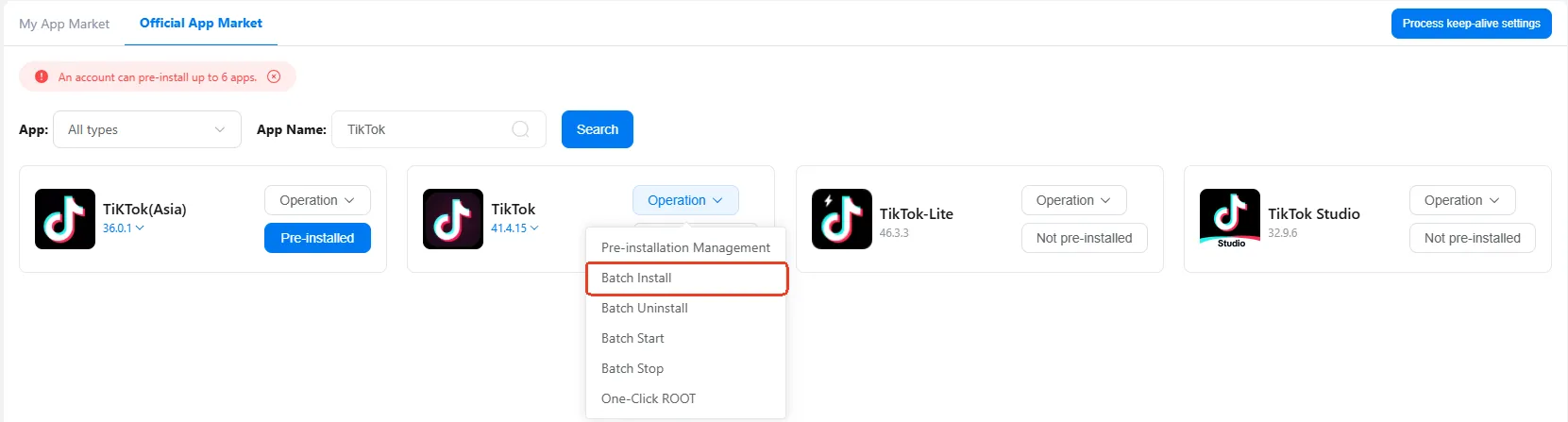
Step 2: Install TikTok from built-in APP Store. When it comes to multiple accounts, navigate to App Market and download TikTok in batch.
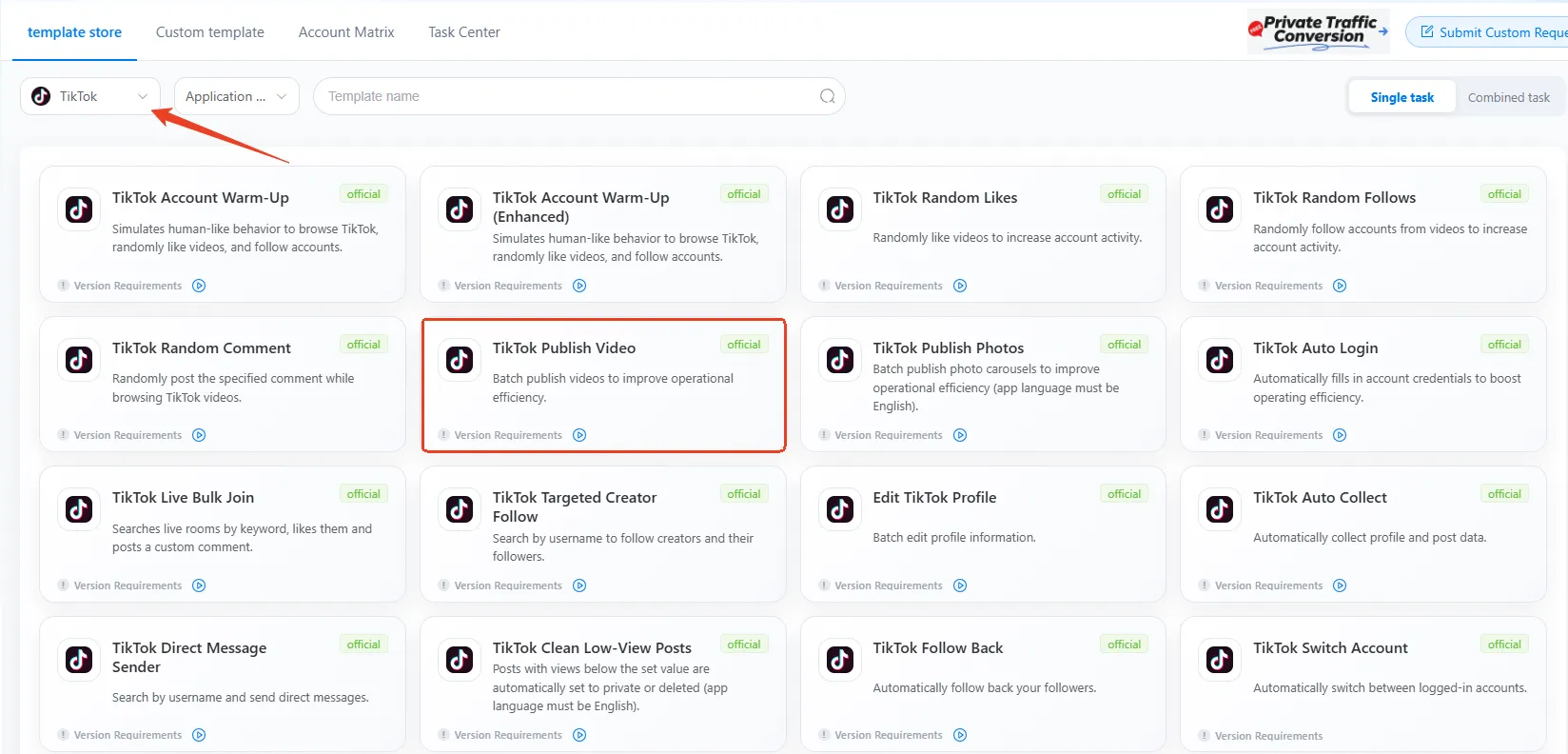
Step 3: Find Automation in the left side bar, select TikTok from the drop-down menu and choose TikTok Publish Video template.
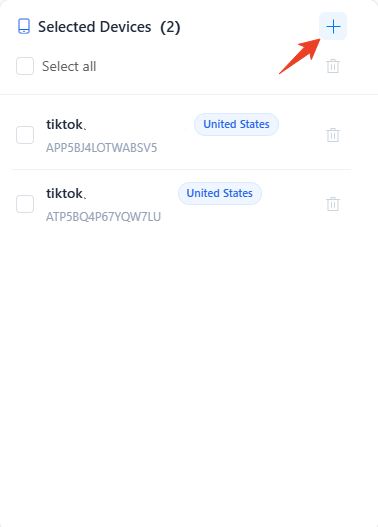
Step 4: Select devices to run the task
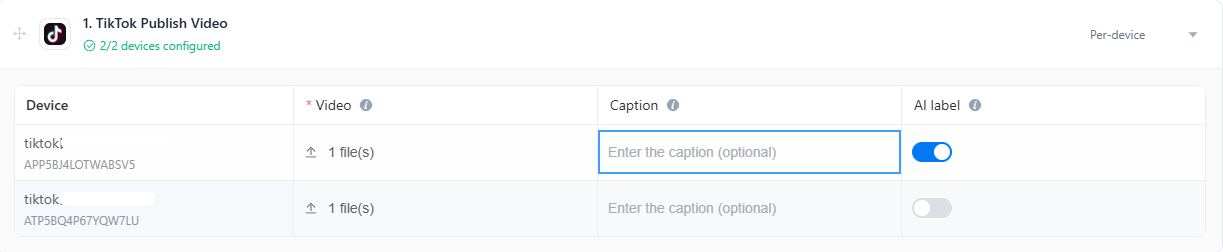
Step 5: Upload videos for target devices, enter captions as per need. Turn on the AI label when your content is generated by AI to ensure compliance with TikTok’s guideline.
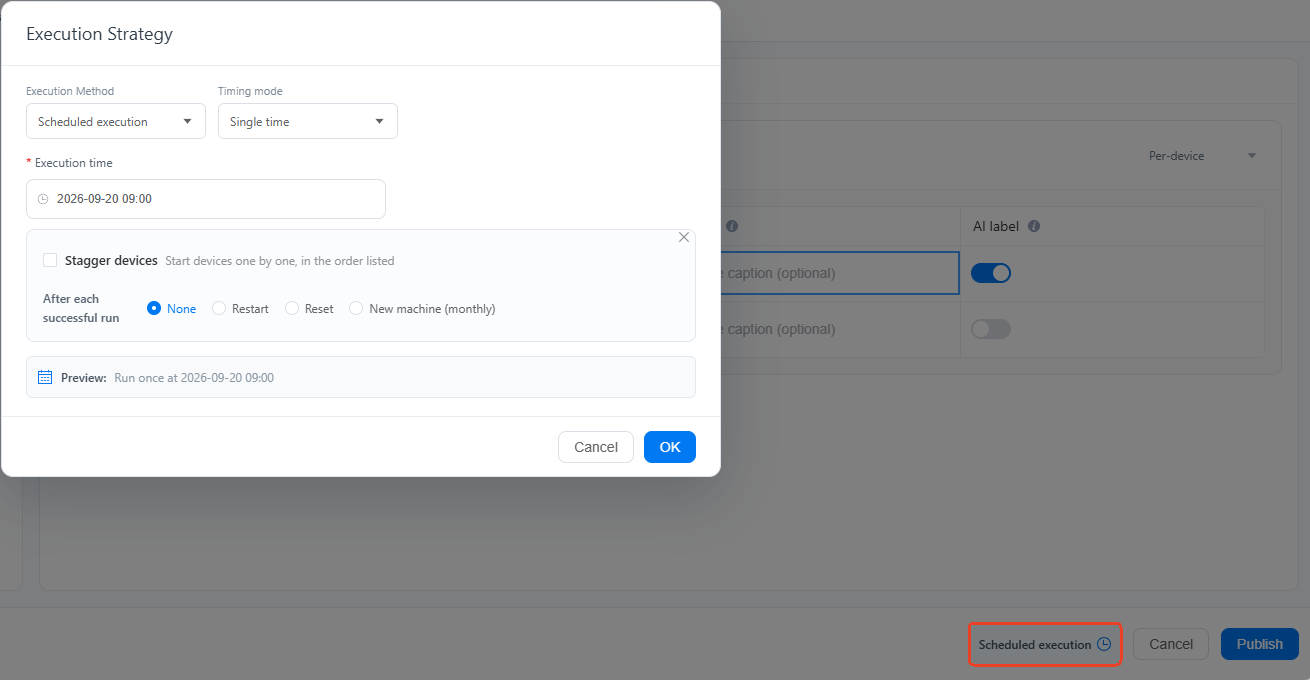
Step 6: Customize the execution time via Execution Strategy, there is no 30-day limit like native scheduler does.
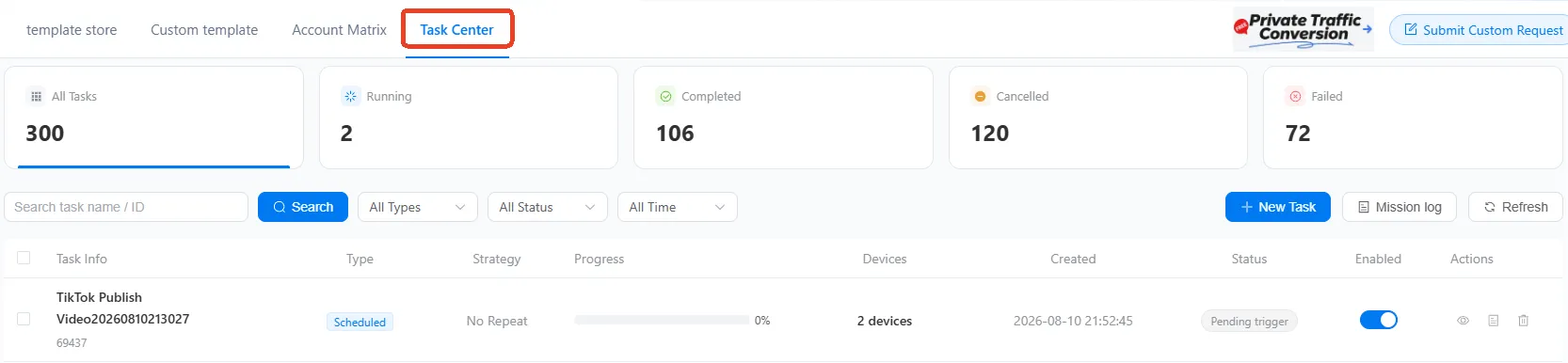
Step 7: Check the scheduled posts in the Task Center.