


There are three practical ways to schedule and automate album posts on Threads:
Threads native scheduling: Create an album post → tap the more icon → choose Schedule → pick the date and time. It is simple and free, but offers limited flexibility.
Social media schedulers: Connect to Meta's API to schedule and auto-post Threads content from a centralized dashboard. Schedulers offer a more scalable and advanced solution but not environment isolation.
Cloud phone+ smart workflow: Combine device-level isolation with no-code workflow, making Threads content distribution efficient and keep accounts in healthy status.
Why Threads album posts are worth paying attention to?
Threads has grown far beyond its early days as a text-first social platform. In June 2026, Meta announced that Threads had reached 500 million monthly active users, highlighting the platform's growth as a space for public conversations and communities. Meta has also been investing in features such as communities, Live Chats, and personalized feeds, giving users, creators and brands more ways to discover and engage with content.
For anyone using Threads as part of a social media strategy, that growing audience brings more opportunities to share content and build conversations. But reaching users is only part of the equation. How you package that content also matters. Text can drive a conversation, but visual content can tell a richer story at a glance—and give users a reason to stop, look, and engage.
That's where Threads album posts come in:
1. Give your content room to say more
Some ideas are simply difficult to fit into a single image. Album allows users, creators and brands to bring several related visuals together in one post, giving you more room to explain an idea, showcase details, or build a visual narrative without making a single image feel overcrowded.
Creators and brands can use album posts to:
Showcase products: Present different angles, features, or use cases.
Create tutorials: Break a process into several visual steps.
Share event highlights: Bring multiple moments together in one post.
Show before and after: Compare different stages or results.
Share behind-the-scenes content: Give followers a broader look at a project or campaign.
2. Get more from your existing visual content
Album posts can also make content repurposing more practical. If you already have product photos, campaign assets, tutorials, or other image collections, you can adapt them for Threads rather than producing completely new visuals for every post.
For example, a product photo set created for an Instagram campaign could be reorganized into a Threads album with a new caption and a more conversation-focused angle.
That means one collection of visual assets can support content distribution across multiple channels without simply copying and pasting the exact same post everywhere.
3. Make every image part of the story
Album works best when the images complement one another rather than simply repeat the same message. Each image can introduce a new detail, perspective, or moment, giving the post a natural flow from one frame to the next. Think of it as a visual progression: the first image gets users to stop, the next one gives them more context, and the rest keeps the story moving.
For example, a product album might start with an overall product shot, follow with close-ups of key features, and finish with the product in use. A creator sharing a tutorial could use each image to guide the audience through a different step.
This turns a collection of images into a cohesive visual story. Instead of asking one image to do all the work, you can let each frame play its own role while keeping the entire post connected.
Can you auto-publish album posts on Threads?
Yes. You don't have to hit "Post" yourself every time. Threads' built-in scheduling, social media schedule management tools, and automation workflows can take repetitive album publishing off your hands. The best approach depends on how much control and flexibility you need.
Native scheduling in Threads
Threads' built-in scheduling feature is the most straightforward option. Instead of drafting and publishing an album immediately, you can prepare the post in advance, select the images, craft the caption, and choose when it should go live.
How it works?
Step 1: Launch Threads app or website and click "What's new" to start a new post
Step 2: Complete details of the album posts: caption, images (up to 500 characters per post)
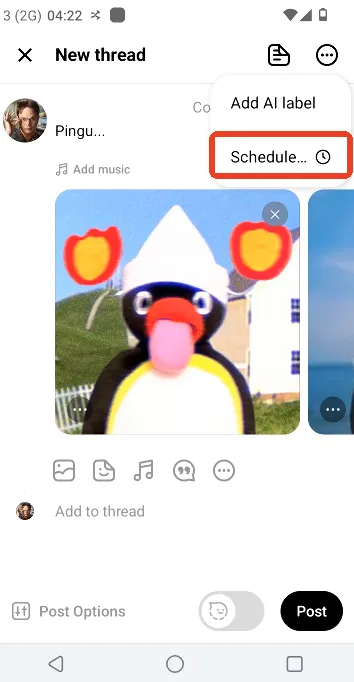
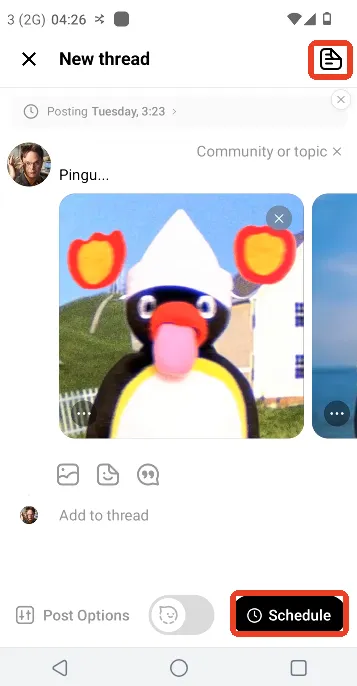
Step 3: Click the more icon on the top right corner and find "Schedule" option
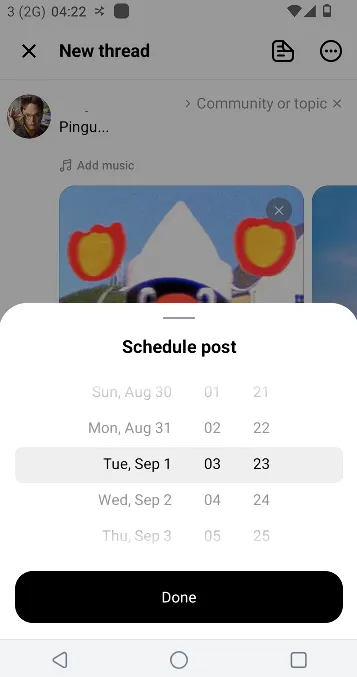
Step 4: Pick the date and time as per your need.(up to 75 days out)
Step 5: Click the Schedule button to confirm.
Step 6: Find scheduled posts in your drafts to edit or delete them.
Best for:
Individuals managing one or a few Threads accounts and simply want to plan posts ahead of time without additional tools or complex workflow.
Cons:
Native scheduling is designed for simple publishing, so it may not be enough for more advanced workflows involving multiple accounts, extensive content libraries, or longer schedule window.
Social media schedule management tools
Social media schedulers typically connect to Threads through Meta's API, allowing users to prepare and schedule content from a centralized dashboard. Depending on the tool and its Threads integration, they may support single posts, album posts, or multi-post chains and publish them automatically at the scheduled time. This makes them a practical choice for social media managers that manage Threads alongside other platforms and want to keep their content organized in one place.
Best for:
Social media marketers and small teams that manage several social profiles and prefer to organize their content from a single dashboard.
Cons:
Social media schedulers operate from a shared web-based or mobile environment rather than providing a dedicated environment for each Threads account. When it comes to dozens or even hundreds of profiles, the lack of isolated environments brings complexity in operation and carries potential risk of account linkage.
Why is cloud phone a good fit for multi-account content distribution on Threads?
When multiple Threads accounts are part of the content strategy, replying on native scheduling or social media schedulers is not always enough. Marketers and businesses also need a way to keep accounts separated and give each one a consistent environment for content publishing. That's where cloud phones fit naturally into the workflow:
Give each account its own environment
Based on the ARM server, cloud phone is just like a real mobile device hosted in the cloud that users can access remotely. Each instance is equipped with unique parameters such as device brand, model, OS, storage, IMEI, phone number, bluetooth address, network settings. The device-level isolation builds a clearer boundary between accounts, makes content distribution more structured and keeps each profile under radar.
Keep content and workflows organized
Account separation also makes content distribution easier to structure.Creators can associate a specific cloud phone with a particular Threads account and assign its corresponding images, captions, and posting schedule to that environment. This helps reduce the chance of mixing up content between accounts and makes repetitive publishing workflows easier to manage.
Cut off heavy workload with smart workflow
Drafting and posting an album on Threads only take a few steps, but doing it account after account is a different story. Launch Threads, switch to the right profile, pick the correct images, add a caption, and hit "Post"—then start all over again for the next account. Rotating that cycle, and before you know it, most of the time is spent on a never-ending chain of clicks rather than inspiring creatives and output content. Reliable cloud phone service providers can streamline overwhelming routines when paired with automation solutions. Instead of manually walking through the same steps every time, users can build a smart workflow to let content distribution move across accounts effortlessly.
Best practice to automate album posts across Threads accounts
With multiple cloud phone providers available in the market, the right choice comes down to how well the service combines device environment with automation flexibility. VMOS Cloud brings these two pieces together with isolated mobile-first environments and no-code automation workflow, giving creators, marketers and businesses a practical way to streamline Threads workflows and grow on autopilot.
Step 1: Go to VMOS Cloud and set up device environment for Threads
High end real machines are better option for more authentic use experience
To build a more distinct account presence, you may customize configuration with different Android versions (10~16), device brand and model, proxy IP etc.
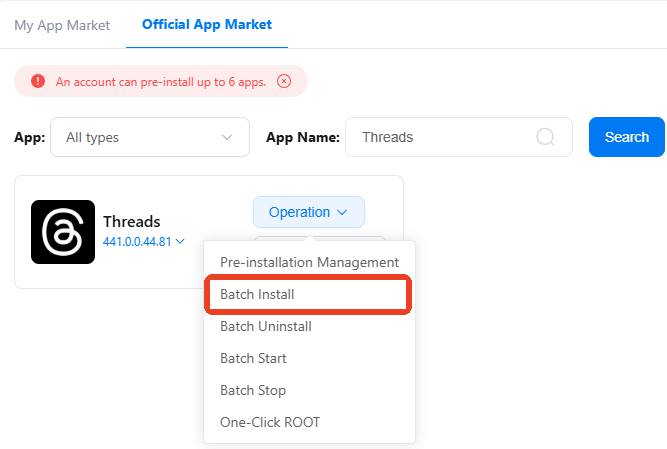
Step 2: When there are multiple profiles, batch operation and synchronizer make it easy to install applications and log in to accounts on separated devices.
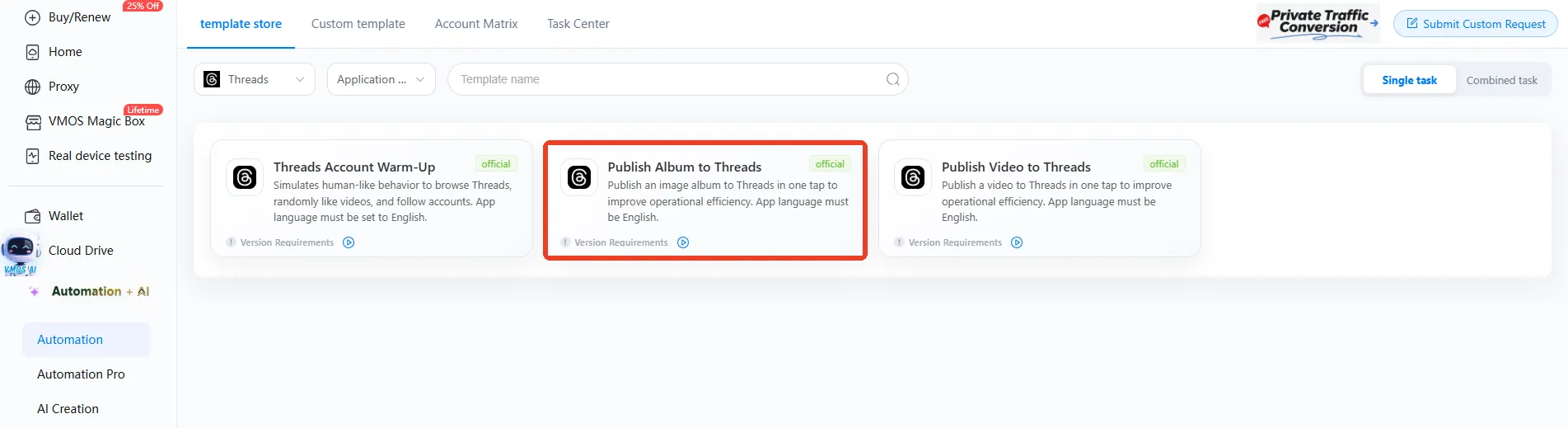
Step 3: Find Automation in the left sidebar, navigate to the template store and choose the required template: Publish Album to Threads
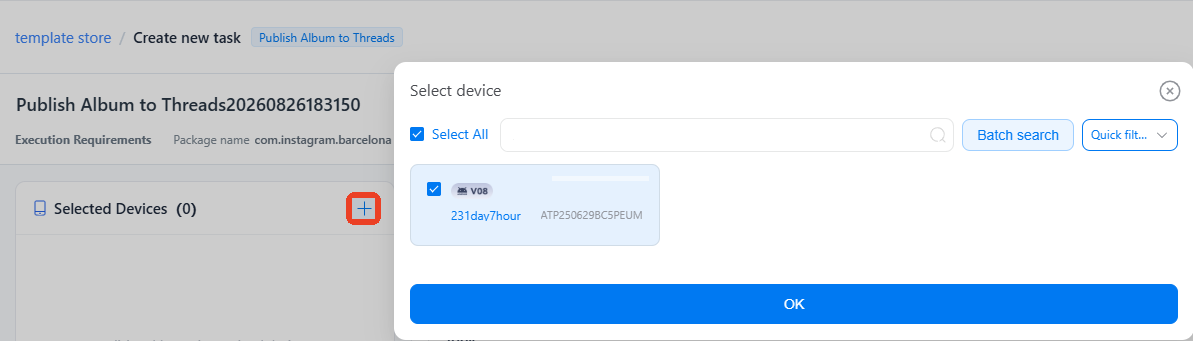
Step 4: Select devices that need to run the task
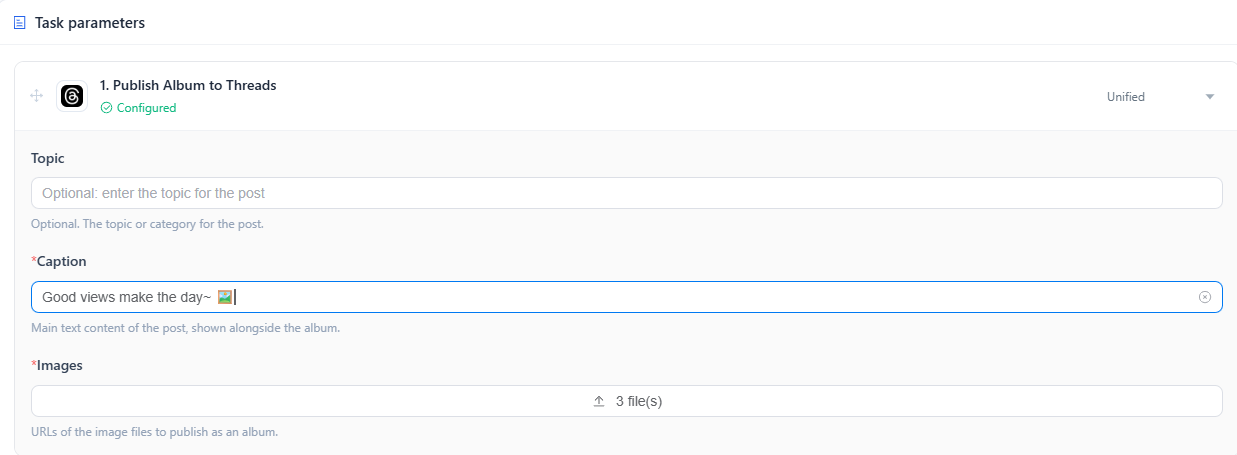
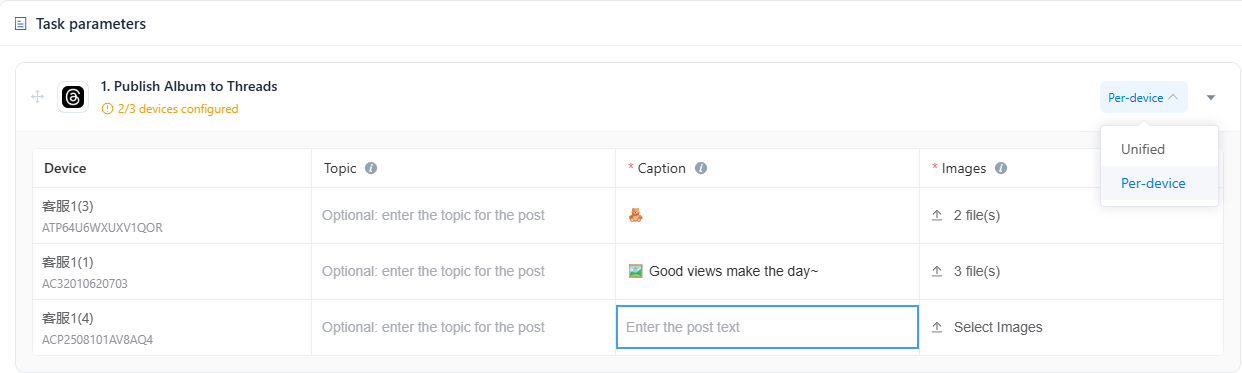
Step 5: Complete task parameters
When there is only a single account, just input caption, upload images and enter topic (optional) to complete the configuration
When it comes to multiple devices, switch to Per-device and assign different contents for different profiles.
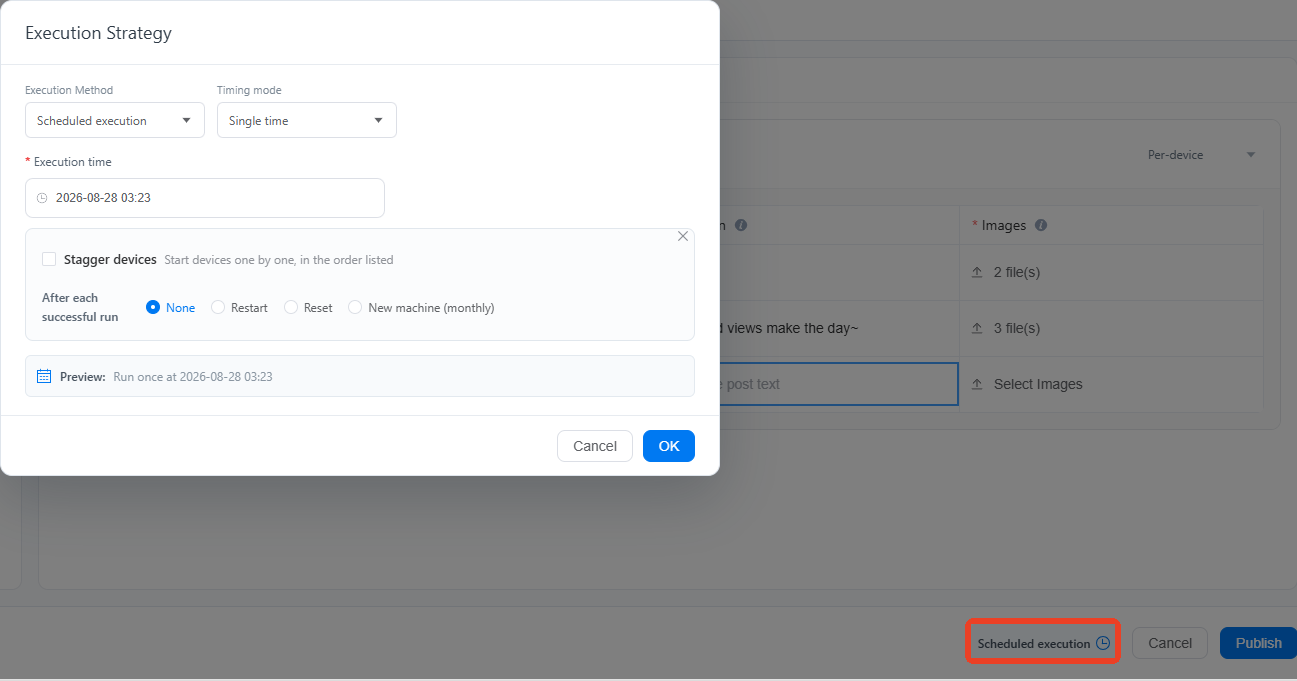
Step 6: Schedule an optimal time to run the task
VMOS Cloud supports flexible execution strategies that allow tasks to run immediately or at scheduled time. There is no limit on the calendar window like what Threads' native scheduling does, making it easier to arrange bulk posts and reach the audience at the peak hours.
Meta's system tracks accounts with multiple signals and one thing many users overlook when automating multiple accounts is behavioral patterns. Imagine hundreds of devices opening Threads at exactly the same time, following the same sequence of actions, and publishing similar content in the same rhythm. Even though the device environments are well configured, the synchronized patterns can still look remarkably alike and lead to account linkage.
Smart scheduling makes accounts' activities closer to real users by introducing timing variations. Instead of running the same task at the same moment, users can assign different batches of accounts to different time windows, add offsets between tasks, and create a more varied execution pattern. The human-like activity pattern works well to cut off the possibility of account association caused by behavioral clusters.
Step 7: Publish the task and track the running status in the Task Center.