


This guide explores three ways to automate TikTok comments:
Browser extensions offer quick setup for simple tasks but are limited by browser-based workflows
Third-party automation tools provide predefined engagement actions but may lack flexibility for complex scenarios
Cloud phone solutions such as VMOS Cloud deliver mobile-native environments and more customizable workflows, enabling users to simplify comment workflow and grow TikTok safely and efficiently.
Why does TikTok comment management matter for you?
TikTok growth is mainly driven by user engagement. To offer personalized experience, TikTok's recommender systems consider multiple signals, including user interactions such as likes, shares, comments, and watch behavior to determine content preferences and decide which contents will be displayed on the "For You" page.
Among these engagement signals, comments stand out as they represent active conversations around a video. A video that encourages users to share opinions, ask questions, or discuss a topic can generate deeper audience interaction and create more engagement opportunities.
For creators, marketers and brands, comments help with:
Increase audience interaction and community engagement
Encourage conversations around products, topics, or trends
Improve brand visibility through active participation
Create additional touchpoints with potential customers
Beyond receiving comments on their own videos, many marketers also use commenting as an outbound engagement strategy. By joining relevant conversations under popular videos, brands can increase exposure within specific niches and connect with targeted audiences.
However, turning comments into a growth strategy is easier said than done. For individual creators, staying involved in relevant conversations can quickly eat into the day. For social media marketers and businesses managing multiple TikTok accounts, the workload only multiplies — from spotting trending videos and finding the right conversations to jumping in with comments that actually fit the context. One video leads to another, and before long, hours can disappear into scrolling, searching, and typing the same kinds of actions over and over again. When this routine is repeated across multiple accounts, grabbing every opportunity becomes harder than you think.
So, is there a smarter way to reach more audiences through TikTok comments without spending hours on manual tasks?
Can you automatically post comments on TikTok?
Yes, you can — but not directly through TikTok itself.
TikTok does not offer a built-in feature to automatically comment on videos, however, there are several ways to automate this process through external automation tools and automation workflows. Let's walk through the common ways to automate TikTok comments.
1. Browser extensions
Browser extensions provide a lightweight way to automate TikTok engagement directly from your web browser. After installation, these extensions add automation features to your browsing environment and can perform repetitive actions such as opening TikTok, finding target videos, entering comment sections, and posting predefined comments.
Some extensions allow users to customize comment lists, rotate different responses, and combine commenting with other engagement actions such as auto-liking. Some also provide real-time visibility, allowing users to watch the automation process as it runs in the browser.
Best for:
Individual creators who want a quick setup
Simple engagement automation without complex configurations
When it falls short:
While browser extensions are easy to use, they are mainly designed for browser-based operations. This can become limiting when users need more flexible workflows, mobile-based environments, or management across multiple TikTok accounts.
Extensions also depend on the browser interface and may require adjustments when TikTok updates its website structure or changes how certain actions work.
2. Third-party automation bots
External automation bots/tools use predefined functions or integrations to automate specific engagement tasks. Users can configure actions such as searching for videos, interacting with content, and posting comments based on selected rules.
These tools usually work through preset workflows, allowing users to automate repetitive engagement without performing every action manually.
Best for:
Creators, marketers or small businesses with a limited number of accounts
Simple engagement tasks with fixed rules and triggers
When does it fall short:
Automation tools rely on fixed rules and triggers, making it harder to adjust workflows for different niches, audiences, or account goals. Once users need handling multiple accounts with different engagement strategies, these tools may struggle to keep up with more complex and customized requirements
3. Cloud phone with automation feature
Based on real ARM servers, cloud phone provide isolated environments with unique device signals (e.g. Android version, IMEI, storage, language and time zone), just like accessing a real mobile phone hosted in the cloud. Instead of switching frequently across multiple accounts in a shared environment, users can manage TikTok accounts and workflows in a fully separated mobile-first environment.
Best for:
Marketers and businesses managing multiple TikTok accounts
Users mainly work in mobile environment
When it falls short:
Subscription is required for this setup. Not cost-effective for individuals or small teams managing a small number of TikTok accounts.
Why use cloud phones to make comments on TikTok?
Run TikTok in a mobile-native environment
TikTok user experience is closely tied to mobile applications. Cloud phone functions just like a real mobile phone hosted in the cloud, perfectly fit the trend. The mobile-first environment supports a more authentic experience closer to regular mobile usage.
While for marketers and brands, cloud phone provide a more flexible approach compared with browser-based automation, especially for workflows that are primarily designed around mobile experiences.
Keep multiple accounts on track
Proceed routine across multiple accounts can get creators and marketers into hassle quickly. Switching between profiles, organizing different workflows and tracking separate performance can take extra time. Cloud phones allow users to create isolated Android environments for different TikTok accounts, making it easier to organize account operations and run different engagement workflows.
Grow TikTok without heavy manual workload
Managing a single TikTok account can feel straightforward. A few comments here, some interactions there, and staying active on the platform can easily become part of your daily routine. But as your TikTok presence grows, the simple routine starts to look very different. Handling comments across multiple accounts means constantly switching between pages, searching for relevant contents, and repeating the same engagement tasks again and again. What works smoothly for one account can quickly become overwhelming when multiplied across dozens of accounts.
This is where cloud phones can make a difference. Reliable cloud phone providers can combine isolated Android environments with automation features. Instead of spending hours on manual operations, teams can build a more efficient system to let the workflow run smoothly and focus on what matters most — creating content and growing their audience.
How to set up auto TikTok comments with VMOS Cloud?
How does VMOS Cloud help to simplify TikTok workflow?
Automation needs can vary depending on the workflow. Some users may prefer ready-to-use solutions, while others need more space to customize tasks. Instead of offering a one-size-fits-all approach, VMOS Cloud provides flexible automation options to help creators and marketers build TikTok workflows to adapt to their own requirements.
AI-Agent automation
AI-Agent automation helps users create workflows by describing what they want to achieve. Users can turn simple instructions into automated tasks without manually building every step, making it a suitable option for those who want to quickly create and test automation ideas.AI-powered templates
VMOS Cloud provides ready-made automation templates for common scenarios, allowing users to deploy workflows without creating them from scratch. For TikTok, these templates can support repetitive tasks such as engagement activities, content operations, and comment workflows, making them a practical choice for users who want a faster setup with minimal configuration.No-code RPA
RPA automation provides an intuitive way to build more customized workflows without coding skill. Users can define actions, conditions, and execution logic based on their specific requirements, making it suitable for more advanced automation scenarios that require greater flexibility.Open API
Developers can use open API documentation of VMOS Cloud to control cloud phones and automate TikTok workflows at scale.
For those who want to get started quickly, AI-powered templates offer the easiest path from idea to execution. Instead of creating workflows from zero, users can simply choose the required template, adjust the settings, and let the automation handle repetitive tasks.
Now, let's take a closer look at how to set up TikTok auto comments with VMOS Cloud's built-in template.
Step 1: Head to VMOS Cloud and set up device environment for TikTok accounts
High end real machines are recommended for more authentic use experience
For more distinct profile presence, you may configure different Android versions (10~16), device brand and model, IP address etc.
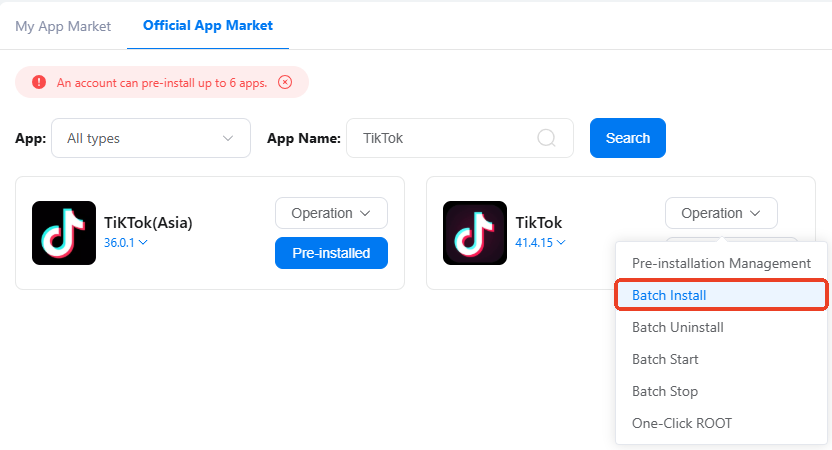
Step 2: Navigate to the APP Market, search for TikTok and batch install it for targeted devices, and then log into TikTok accounts.
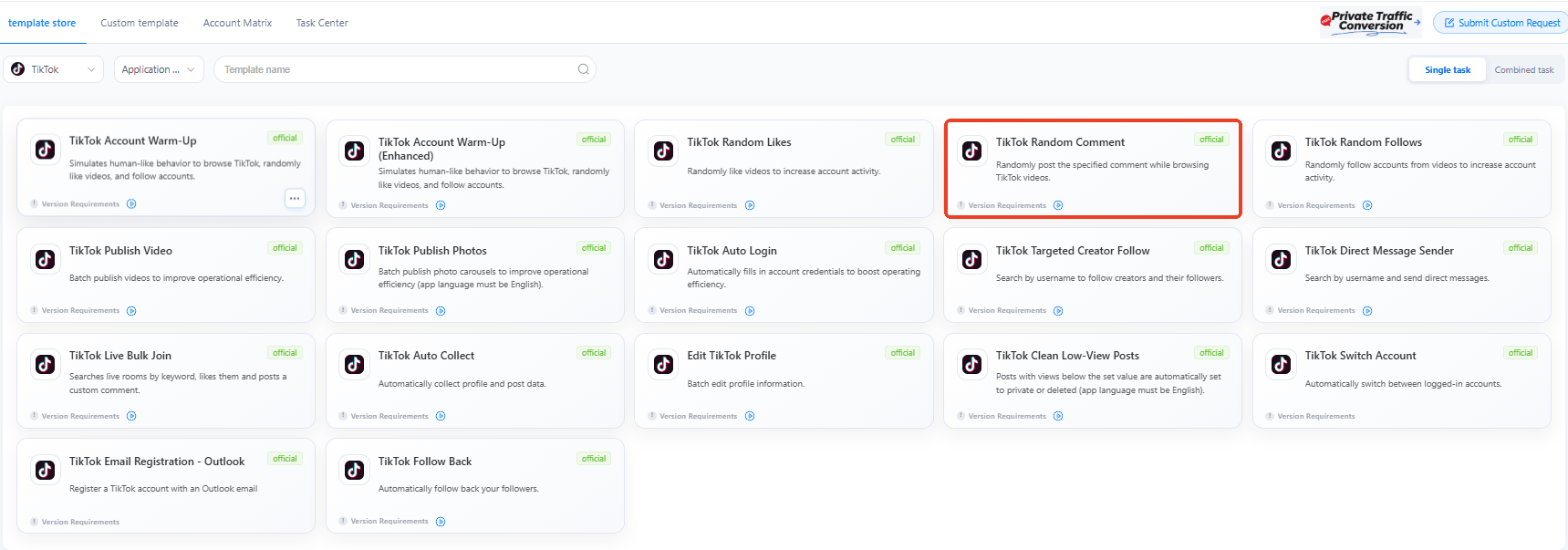
Step 3: Find Automation in the left sidebar, go to the template store and choose the required template: TikTok Random Comment.
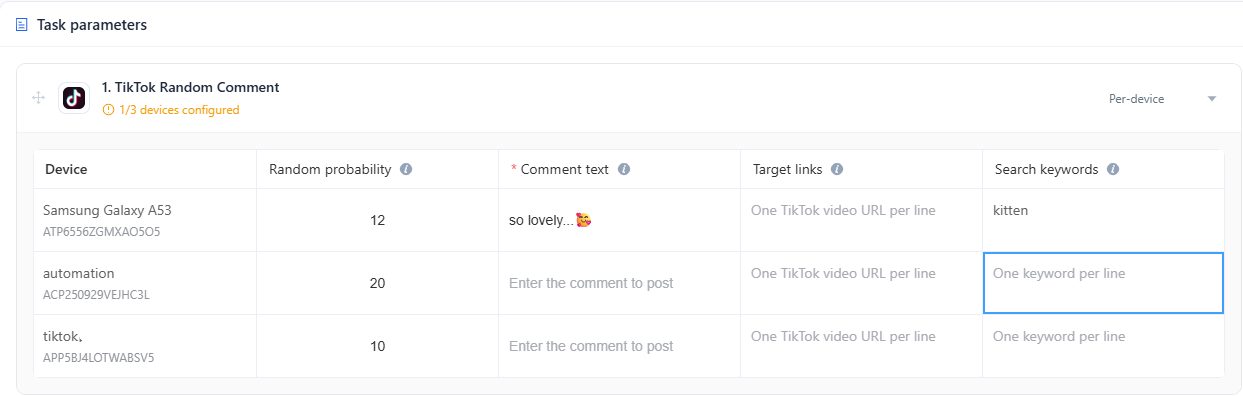
Step 4: Configure the task parameters
Add devices that need to run the task.
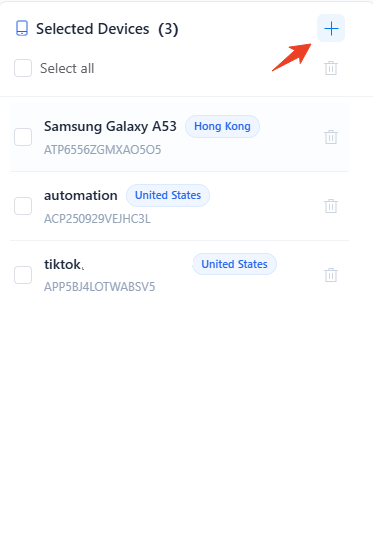
Set the random probability for comments
(avoid sudden spike of identical comments that can be easily viewed as spam or bot-like action, leading to engagement drop or potential account red flags)Input comment context.
If needed, you may also complete links of target videos and keywords to browse and comment on more relevant contents.
Step 5: Schedule optimal time to run the task. Expand reach and get more engagement at peak hours.
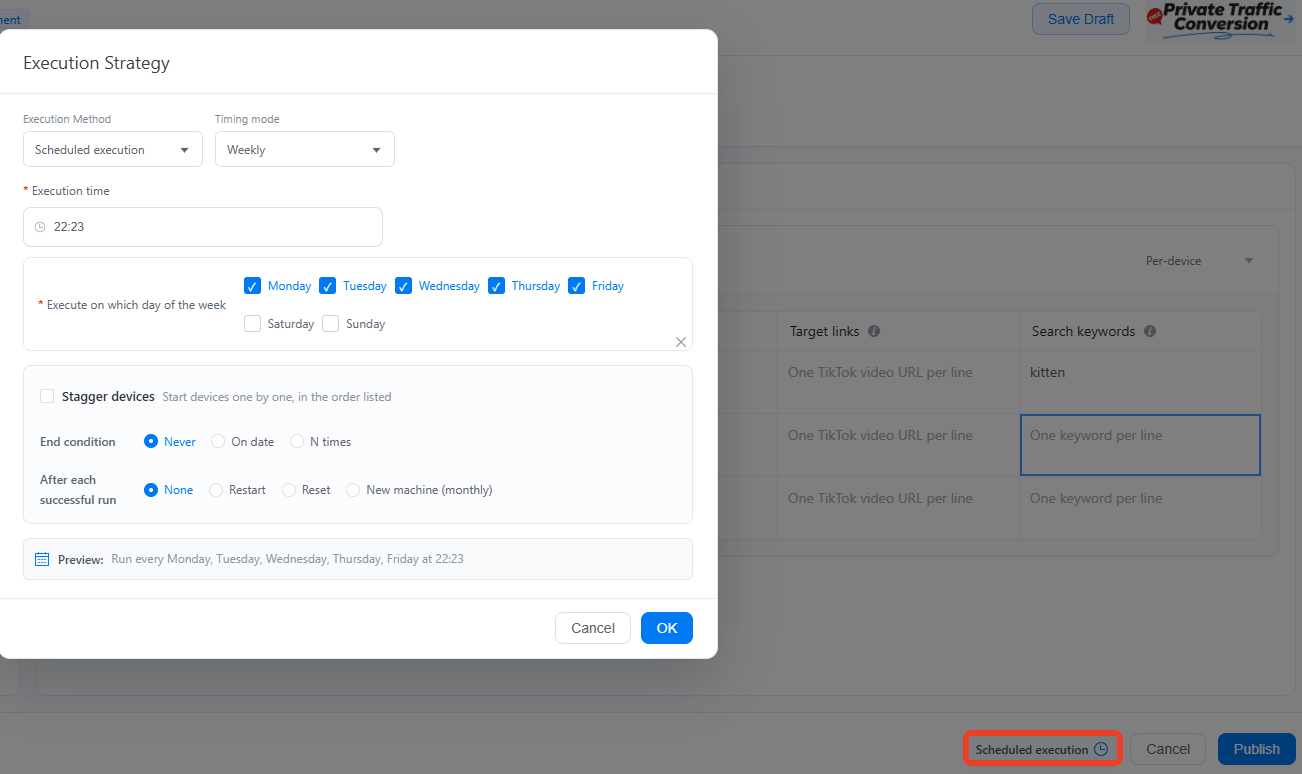
Step 6: Publish the task and track the running status in cloud phones or Task Center.